TL;DR
- •WebMCP is a single new browser API -
navigator.modelContext.registerTool(...)- that lets a page declare its capabilities as JavaScript functions an AI agent inside the browser can call directly. - •It is for agents, not humans. Specifically, browser-side agents acting on behalf of a logged-in user - Gemini in Chrome, the WebMCP Inspector extension, in-page assistants, and headless-Chrome stacks like Browserbase / Browser Use.
- •Co-authored by Google and Microsoft at the W3C Web Machine Learning Community Group. Behind a Chrome Canary flag today; origin trial opens in Chrome 149, currently in the Early Preview Program.
- •The spec includes
options.exposedTo(per-tool origin allowlist) and is gated by the standardPermissions-Policy: toolsdirective - so you can allow / disallow specific agent origins. - •WebMCP does not replace CDN- or server-side bot controls. If your edge blocks a User-Agent, that agent never sees the page, never sees the tools. Conversely, if your edge lets everyone in, WebMCP lets you selectively expose tools to some agents only.
- •We forked the Rankly Merch Store, layered 16 WebMCP tools on top, and wired both an in-page chat assistant and Google's official Inspector extension to drive the same registry. The video at the top walks the end-to-end flow.
What is WebMCP?
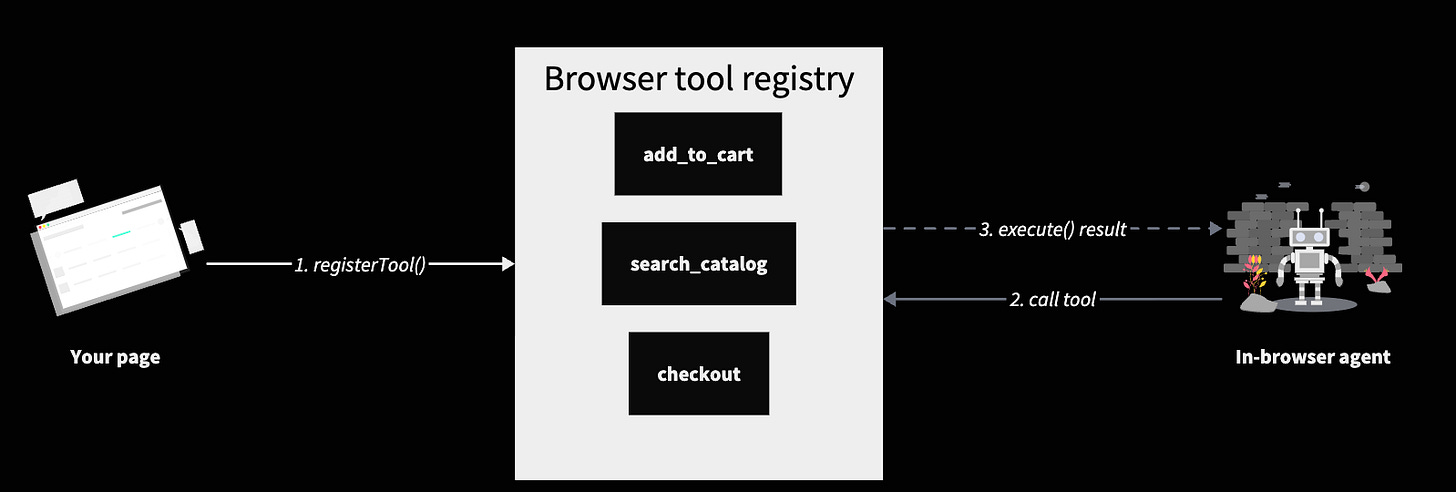
WebMCP is a draft web standard that adds one new browser API: document.modelContext.registerTool(tool, options). It exposes nothing else and ships no tools of its own. Every “tool” on a WebMCP-enabled page is just a JavaScript function that the site itself decided to register. The spec lives at webmachinelearning.github.io/webmcp, edited by Brandon Walderman (Microsoft), Khushal Sagar (Google), and Dominic Farolino (Google).
A tool definition has four pieces: a name (matching [A-Za-z0-9_.\-]128), a natural-language description the model reads to decide whether to call it, a JSON Schema inputSchema, and an async execute(). Page-scoped lifecycle is the convention: register on mount, unregister on unmount via the options.signal AbortSignal.
document.modelContext.registerTool(
  {
    name: ‘add_to_cart’,
    title: ‘Add a product to the cart’,
    description:
      ‘Add a product to the signed-in user cart. ‘ +
      ‘Identify by slug (preferred), productId, or name (fuzzy).’,
    inputSchema: {
      type: ‘object’,
      properties: {
        slug:      { type: ‘string’ },
        quantity:  { type: ‘integer’, minimum: 1, maximum: 20, default: 1 },
        variantId: { type: ‘string’ },
      },
      additionalProperties: false,
    },
    annotations: { readOnlyHint: false },
    execute: async ({ slug, quantity = 1, variantId }) => {
      const product = await api.get(`/products/${slug}`)
      const cart = await addItem(product._id, quantity, variantId)
      return { ok: true, productName: product.name, cart }
    },
  },
  { signal: abortController.signal }   // unregister when this component unmounts
)
That’s the entire API surface a page touches. The spec also defines a declarative API that turns annotated HTML <form> elements into tools, shipped alongside the imperative path.. Everyone shipping a real integration today is on the imperative JS path above.
Who it's for - human or agent?
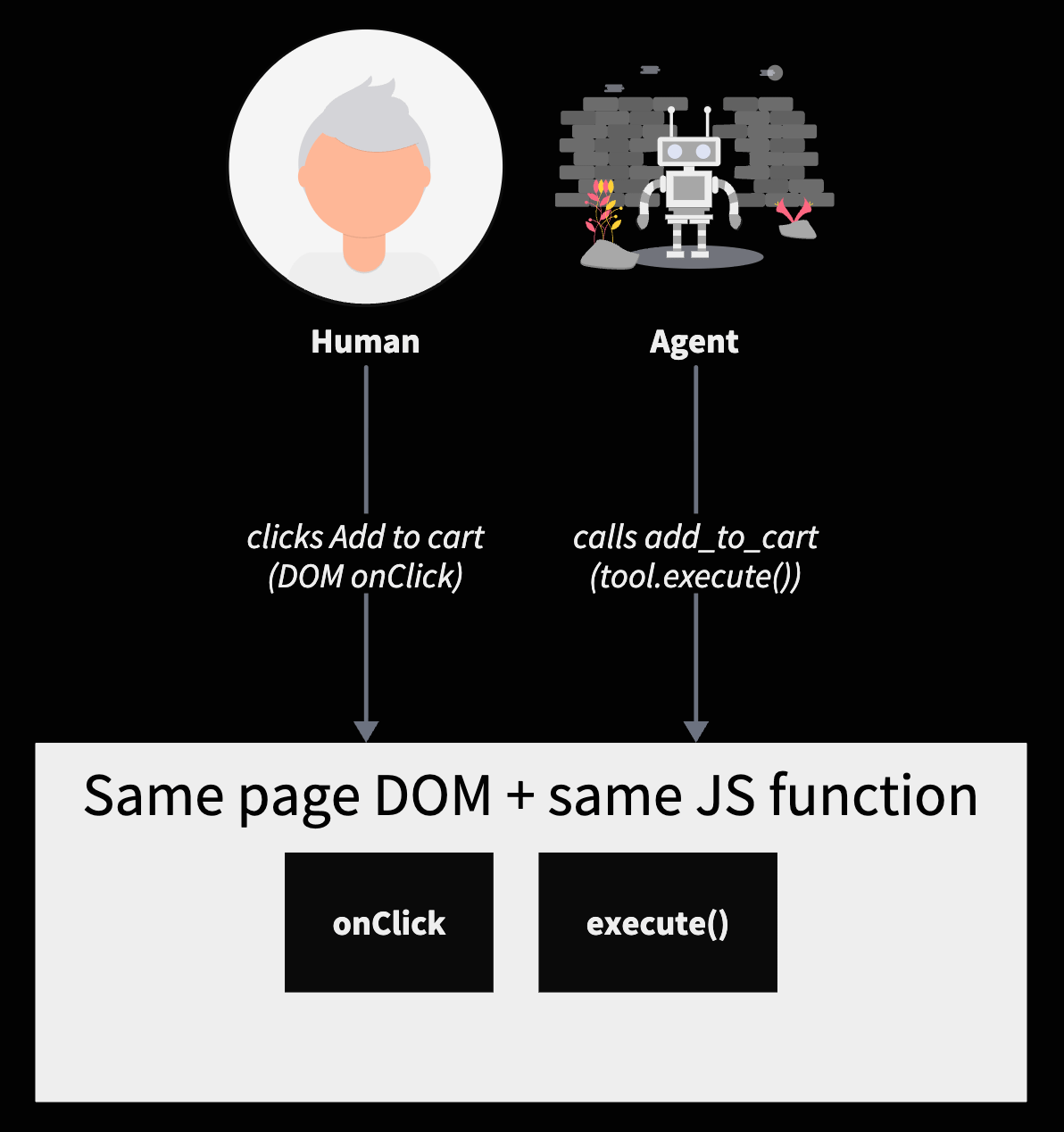
WebMCP is for agents only. A human visitor sees nothing different: the same buttons, the same forms, the same DOM. The tool registry sits on a separate channel - document.modelContext - that humans never touch. The page’s job is to declare its actions as tools; the human flow keeps working as it did.
The mental model is closer to structured data for AI than to a UI. Just as schema.org lets a page declare “this div is a product with a price” for search crawlers to parse, WebMCP lets a page declare “this site supports the action add this thing to a cart, here’s how to call it” for agents to invoke. Same idea, one layer up the abstraction stack: from describing content to describing capabilities.
Which agents specifically
Not all agents. WebMCP is a browser API - it only exists inside a tab that has it enabled. Server-side bots that fetch HTML over a CDN edge will never see document.modelContext because there is no browser in their request path. WebMCP is for the class of agents that act through a real browser, on behalf of a real (usually signed-in) user.
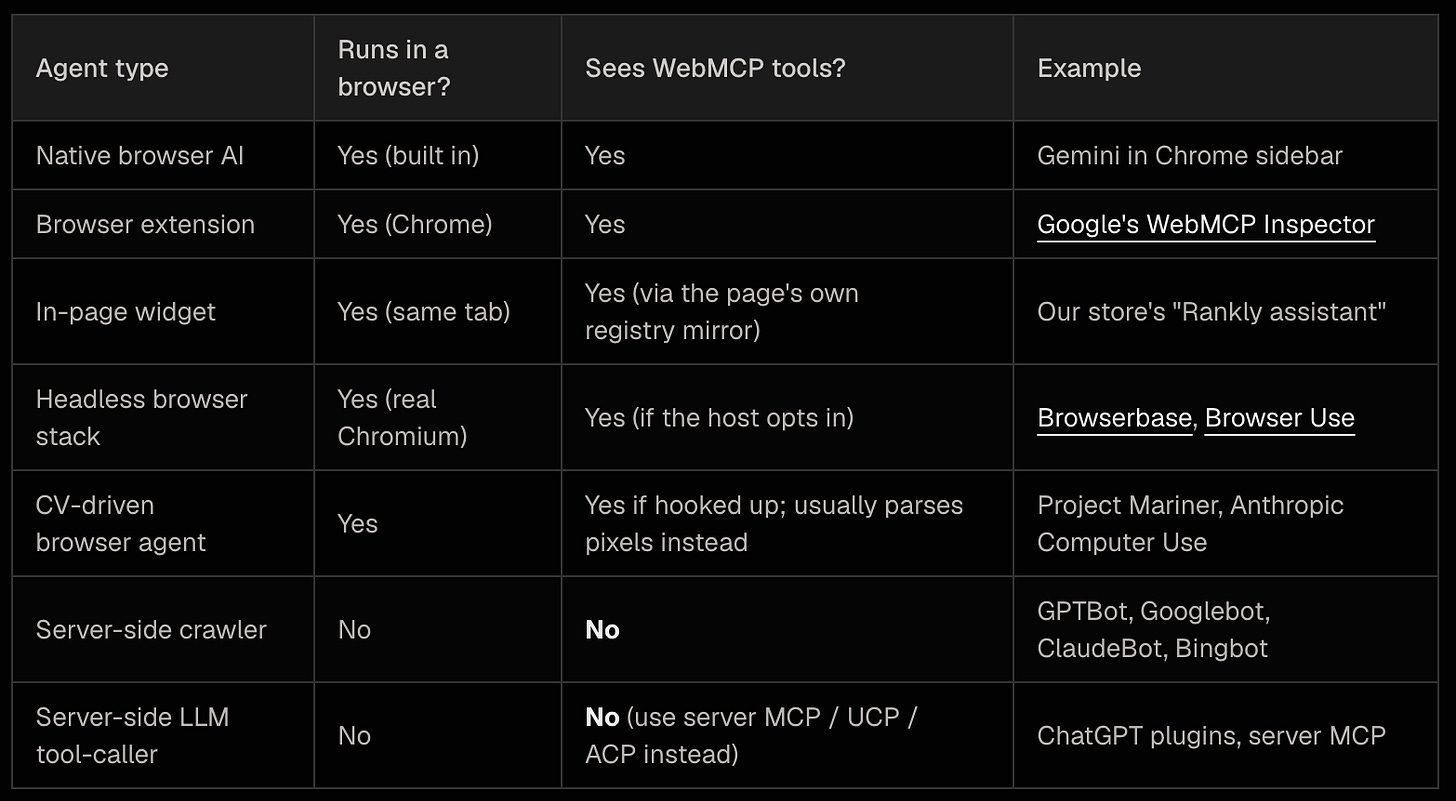
The four rows where the answer is “Yes” have something in common: a real browser tab is open, with a real user session. That’s the niche WebMCP fills. The bottom two rows - the kind of crawler-bot most people picture when they hear “AI agent” - are not WebMCP’s audience. For those, the existing server-side protocols still apply: structured data for indexing, MCP for LLM-host integrations, ACP for OpenAI’s agentic-commerce stack, UCP for Google’s.
Why it's locked behind EPP right now
As of May 2026 the API is available only in Chrome Canary 146+ behind a chrome://flag. The public origin trial is announced for Chrome 149 but the registration card is not yet visible on the Origin Trials dashboard - listings typically appear when the target Chrome version hits stable. The current path is the Early Preview Program, which is the official Chrome AI team mailing list and gives you early documentation plus the notice when the trial opens.
This matters for what users actually experience on a deployed site today. Without an origin trial token, regular stable-Chrome users won’t have document.modelContext exposed on your origin even if you ship the integration. Three things still work for them: an in-page assistant the site itself runs (no browser-side API needed), Google’s WebMCP Inspector extension if they install it (uses a separate navigator.modelContextTesting interface that piggybacks on extension permissions), and any Canary user with the flag enabled. The mass-market “Gemini-in-Chrome sidebar calls your tools without anyone installing anything” story needs the trial.
Who made it, and why now
WebMCP is a W3C Web Machine Learning Community Group draft, not yet on the W3C Recommendation track. Three editors: Brandon Walderman (Microsoft), Khushal Sagar (Google), Dominic Farolino (Google). The Intent to Experiment for Chromium was filed in April 2026; the public announcement was at Google I/O 2026.
The gap WebMCP fills is narrow but real. Today, when a browser-side AI agent wants to take action on a site - “add the black polo to my cart” - it has one of two bad options: parse the DOM and click pixels (slow, fragile, breaks every time the site ships a redesign) or call the site’s server API directly (requires the agent to discover, authenticate, and authorize against a separate auth system the user is already signed in to in the browser). Both have been the state of the art for years. Neither is good.
WebMCP’s claim is that the right abstraction is neither. The page is already running, already logged in, already has working code paths for every action a UI offers. The agent should call those functions - the same ones the buttons call - with structured arguments. That eliminates DOM scraping and authentication-juggling in one move. It also keeps the user fully in the loop: every tool runs in the user’s tab with the user’s session, not on a server the user has no view into. That last property is why Google in particular pushed it: browsers are the consent boundary, and WebMCP keeps the consent boundary intact while making the agent useful.
How you allow or disallow specific agents through WebMCP
The spec gives you two controls. Both are origin-based, not bot-name-based - WebMCP doesn’t look at User-Agent strings.
1. The Permissions-Policy: tools header. Standard HTTP header, sent by your server or CDN. Controls which origins are allowed to expose tools at all. The default is self: only your own origin can call registerTool on your pages. You can broaden it, or you can lock it down to specific embedded origins (cross-origin frames embedding your page).
# Default (recommended): only the page’s own origin can registerTool
Permissions-Policy: tools=self

# Allow a specific partner-frame origin to also register tools
Permissions-Policy: tools=(self “https://partner.example.com”)

# Disable WebMCP on this origin entirely
Permissions-Policy: tools=()
2. The per-tool options.exposedTo allowlist. A list of agent origins that are allowed to see and call this specific tool. If you only want a particular browser-side agent (say, a known partner’s extension running with a documented origin) to be able to call complete_checkout on your store, you put that origin in exposedTo and every other agent sees the tool as not-existing.
document.modelContext.registerTool(
  {
    name: ‘complete_checkout’,
    description: ‘Place the order with the current cart...’,
    inputSchema: { type: ‘object’, properties: { /* ... */ } },
    execute: async (_input, client) => {
      // Spec-blessed user-confirmation gate before destructive actions
      const ok = await client.requestUserInteraction(() =>
        window.confirm(’Place this order?’)
      )
      if (!ok) return { ok: false, error: ‘user_declined’ }
      // ... actually place the order
    },
  },
  {
    signal: ctrl.signal,
    // Only these specific agent origins can see this tool. Everyone else won’t
    // know it exists.
    exposedTo: [
      ‘https://gemini-in-chrome.google’,
      ‘https://inspector.webmcp.dev’,
    ],
  }
)
These two controls compose. Permissions-Policy is a coarse on/off at the origin level. exposedTo is a fine-grained allowlist per tool. Add the spec’s client.requestUserInteraction(...) on destructive tools and you have three independent gates: a server-decided origin allow-list, a page-decided per-tool allow-list, and a user-decided confirm-on-call.
One thing missing from the current draft: there is no User-Agent allowlist. WebMCP works on the origin model, not the bot-name model. If you want to allow GPTBot but block ClaudeBot, that’s still your edge layer’s job - and as covered above, those bots aren’t in WebMCP’s audience anyway.
Where it sits in the stack - CDN, server, page, browser

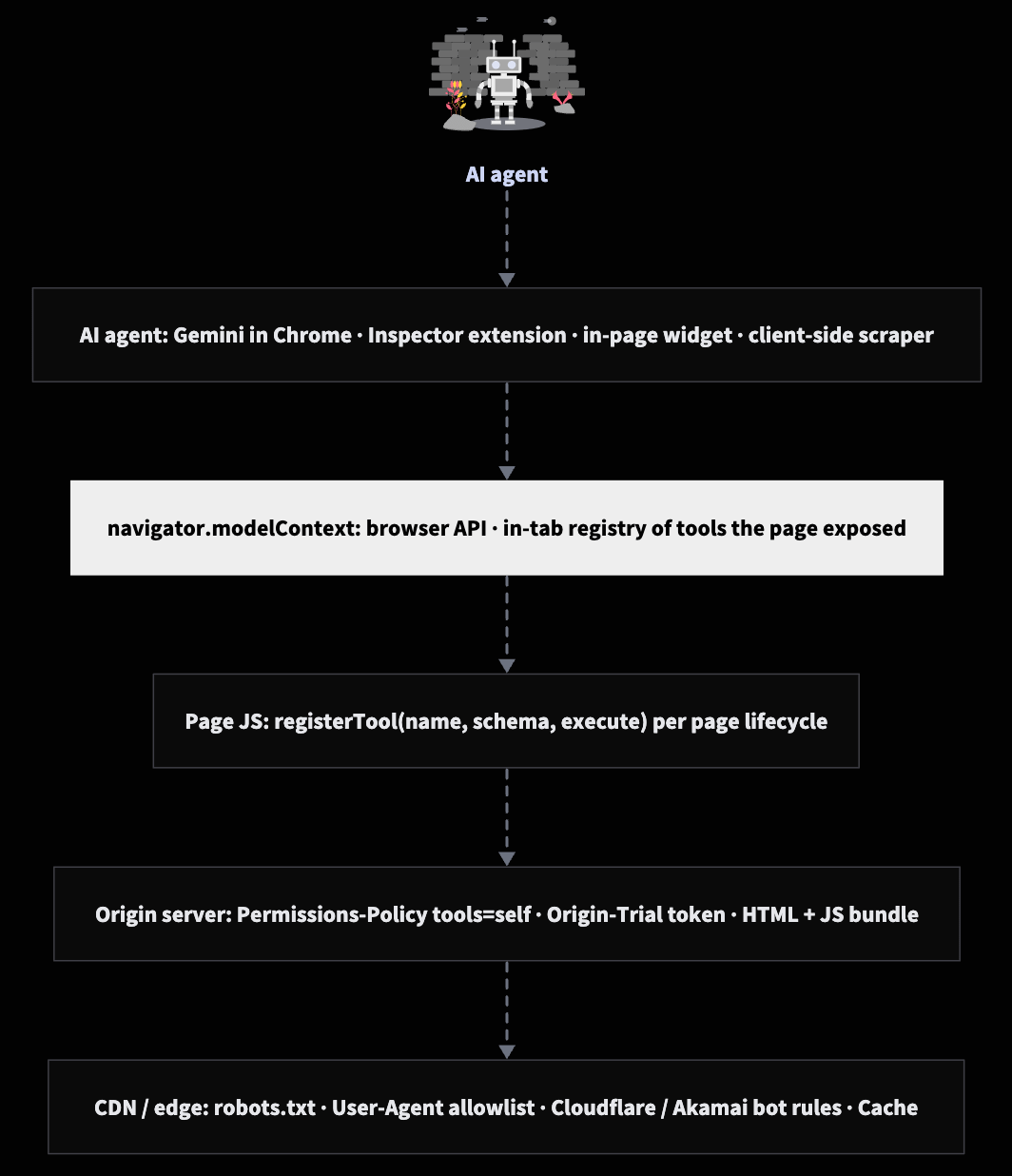
WebMCP is a client-side mechanism. The API itself only exists in the browser tab. But two of the configuration surfaces are server-delivered:
- CDN / edge - decides which clients (by IP, User-Agent, rate limit, signed token, geo, robots.txt convention) get to fetch your HTML and JS bundle in the first place. Anything blocked here never reaches WebMCP.
- Origin server / HTML response - sends the
Permissions-Policy: toolsheader, ships the page JS that callsregisterTool, and (during the trial period) injects theOrigin-Trialtoken meta tag that turns the API on for stable Chrome users. - Page JS - calls
registerToolwith per-toolexposedToallowlists and lifecycleAbortSignals. - Browser - owns
document.modelContext, enforces the policy, surfaces tools to whichever in-browser agent the user has running.
Read the diagram earlier in the post left-to-right: a request travels up the stack; controls work from the outside in. CDN blocks happen before anyone sees a single byte of HTML. WebMCP only kicks in for clients that already made it past the edge, into a tab, with the page rendered. It is not a substitute for the edge. It is a different control surface for a different audience.
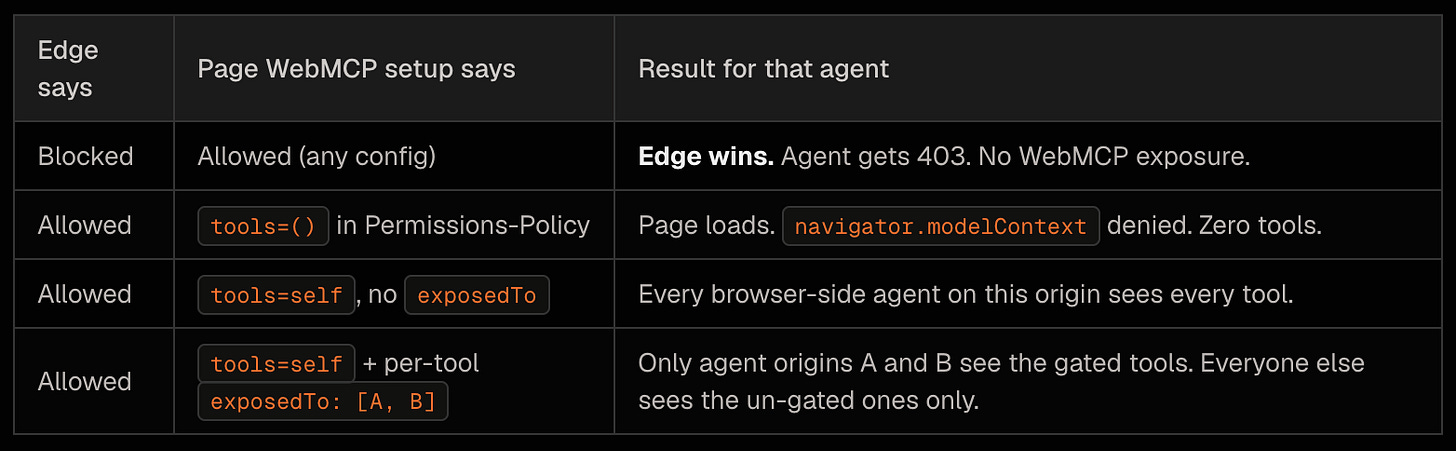
Scenario A: CDN blocks everything. Can WebMCP let some agents through?
No. If your CDN refuses to serve the page to an agent’s request - because of User-Agent, IP, rate limit, missing auth header, signed bot-pass token, anything - the agent never sees the HTML, never sees the JS bundle, never reaches the document.modelContext.registerTool call. WebMCP runs three layers up; you can’t use it to retroactively let in something the edge already rejected.
This is mostly a moot scenario for the agents WebMCP actually targets. Gemini-in-Chrome, the Inspector extension, and in-page widgets all run inside a normal browser tab opened by a real user - so the request the CDN sees is indistinguishable from any other human visit. There’s nothing to block at the edge in the first place. The case where this matters is headless browser stacks like Browserbase and Browser Use: those do hit your CDN with identifiable User-Agents or IP ranges. If your edge blocks them, WebMCP doesn’t change anything.
Scenario B: CDN allows everyone. Can WebMCP selectively block some?
Yes - but with an important asterisk. If your edge serves your HTML to anyone, WebMCP gives you two ways to scope the tool registry without changing the user-facing UI:
- Send
Permissions-Policy: tools=()to disable WebMCP entirely on the response - the page renders normally for humans, but no agent on any origin can call into the registry. - Keep WebMCP enabled at the origin level, but use per-tool
exposedToto limit individual tools to specific allowed agent origins. Everyone else loads the page fine, sees the un-gated tools (or none, if you wanted), and is denied at the registry level when they try to invoke a gated one.
The asterisk: WebMCP gates by origin of the calling agent, not by “is this a bot.” If a user opens your page in Chrome, with the Gemini sidebar enabled, and Gemini calls add_to_cart - the agent’s origin is whatever Chrome reports for the built-in AI surface. If you only want partner-X’s extension to call complete_checkout, you list partner-X’s extension origin. You cannot say “allow OpenAI agents only.” You can say “allow this specific browser-side surface only.”
Server-side bots - GPTBot, ClaudeBot, the long tail of scrapers indexing your content for retrieval - are unaffected either way. They never run in a browser, never see document.modelContext, and have nothing to call. If you want to keep those out, that’s still robots.txt + edge rules.
How agents actually arrive on a WebMCP-enabled page
Three concrete vectors today. Each shows up as a different kind of presence in the user’s tab.
- Native browser AI (e.g. Gemini in Chrome). The user opens your page; Chrome’s built-in agent sidebar is one click away. When the user asks it to do something, it reads the registered tool list from
document.modelContextand calls the matching tool. This is the “every Chrome user gets an agent for free” story - the one gated on the origin trial token going live for stable Chrome. - Browser extension (e.g. Google’s WebMCP Inspector). Installed by the user once, the extension hooks into a separate
navigator.modelContextTestinginterface that piggybacks on extension permissions, so it works on any site even without an origin trial token. It shows the tool list, lets you execute tools manually with JSON inputs, and can run a BYO-key chat (Gemini, OpenAI, Anthropic, Ollama) that drives them. - In-page widget shipped by the site itself. A “chat with us” widget in the corner, but instead of being a separate support-bot it’s an actual agent that reads your own page’s tool registry and invokes tools directly. This is what we built for the Rankly Merch Store demo. Works for every visitor, no install, no token. Below it sits Browserbase- / Browser Use-style headless stacks: same shape, just with the browser owned by a server instead of a user.
Notice that none of these arrive through a request the CDN can identify as “an agent.” The HTTP request reaching your edge looks like a normal user’s browser request, because it is one. The agent is acting through the browser, not as the browser. That’s the WebMCP architectural premise in one line.
WebMCP on the Rankly Merch Store
We took a fork of our live merch store and layered WebMCP on top. The video below shows it end to end; here is what is actually shipped:
- 16 globally-registered tools on every page:
search_products,get_product,list_categories,view_cart,add_to_cart,navigate,best_sellers,find_deals,sign_in,sign_in_demo,register_user,authenticate,local_availability,track_order,returns_policy,faq_support. - Page-scoped tools registered only on the page they make sense for:
select_variant/set_quantity/find_in_store/leave_reviewon product detail, cart-mutators on cart, address + checkout-completer on checkout. Lifecycle is the spec’sAbortSignalpattern - register on mount, unregister on unmount. - Two ways to drive the registry from the page itself. A demo mode that needs no API key (hardcoded intent router, 181 / 181 regression cases), and a live mode that calls the Claude Messages API directly from the browser with a chips protocol the model emits at the end of each turn.
- Two external surfaces the same registry serves automatically: Google’s WebMCP Inspector extension (auto-detects all 16 globals via
navigator.modelContextTesting), and any Canary user with the WebMCP flag enabled. - Zero backend changes. WebMCP is client-side. The store’s existing UCP, ACP, and server MCP endpoints are untouched - the new browser-side surface is additive.
We tested it side by side with the official extension on real product pages. The agent can search the catalog, sign the user in via a throwaway demo account, add items to cart, walk through checkout, and place an order - all without parsing the DOM, all on the user’s real authenticated session.
What it means for merchants
WebMCP doesn’t replace the protocol bets you’ve already made. If you’re building for ChatGPT’s shopping connector you still need ACP; if you’re building for Google’s Universal Cart you still need UCP; if you’re shipping a server MCP endpoint for any LLM-host integration you still need that. Those are server-side surfaces aimed at server-side agents.
WebMCP adds a fourth surface: browser-side agents acting on behalf of your logged-in user, in their own tab. The user-experience implication is the bigger one. When Gemini-in-Chrome rolls out broadly and the origin trial opens to stable Chrome, every site that has registered its actions becomes natively drivable from a sidebar 65 % of internet users already have. Sites that haven’t fall back to DOM scraping with all the latency and reliability that entails. The merchants who treat WebMCP as “an extra channel to ship to” will have a meaningful UX advantage when that wave lands - and a near-zero cost of entry today, because everything you need to ship is page JavaScript.
The thing to watch is the Chrome 149 origin trial. The day the dashboard listing opens, registering your origin is a 10-minute job that converts “works for Canary devs and extension users” into “works for everyone on stable Chrome.” That’s the moment WebMCP stops being an experiment and starts being part of the default shopping surface.
References
- • WebMCP spec - W3C Web Machine Learning Community Group, May 20 2026 draft
- • Chrome for Developers - WebMCP - official Chrome team page
- • WebMCP Early Preview Program announcement - Chrome Developers blog
- • Intent to Experiment: WebMCP - Chromium blink-dev
- • WebMCP - Model Context Tool Inspector - the official Chrome Web Store extension
- • Inspector source - François Beaufort (Chrome DevRel)
- • Google I/O 2026 recap - the keynote where WebMCP was publicly announced