ChatGPT serves over 800 million weekly active users, and a meaningful share of those sessions are buying intent. The question is no longer whether to show up — it's how. Two surfaces are emerging: the answer surface (where you can be cited) and the app surface (where you can render a branded experience and own the path to checkout). This is a tour through the second surface and the four layers of personalization it unlocks.
The Shift
ChatGPT now serves over 800 million weekly active users, a number Sam Altman shared at OpenAI’s October 2025 Dev Day. A meaningful share of those sessions are buying intent. 61% of Americans now use GenAI tools like ChatGPT for online shopping, and one in four say ChatGPT beats Google for product research. Gartner projects traditional search engine volume will drop 25% by 2026 as queries migrate to AI surfaces.
There are two ways to respond. The first is to fight for visibility in the answer text, the LLM-native version of SEO sometimes called AEO. The second is to ship an actual application inside the chat, so the model can hand off to a programmable, branded surface you control end to end.
The first approach has a ceiling. You can be cited but you cannot render. Your products appear as text bullets ranked alongside competitors, with no brand voice, no imagery, and no checkout path you control. The second approach lifts that ceiling, but it requires building an app. The Apps SDK is built on MCP, the storefront has to honor brand guidelines, the data has to come from a real catalog, and inventory and pricing have to stay live. That is the gap we set out to close.
Answers vs Apps: Two Surfaces, Two Ceilings
Most of the agentic commerce market conflates two distinct surfaces. The answer surface is the LLM’s text response. Your brand can appear here as a citation, a recommendation in a paragraph, or a product mention in a list. You influence it through structured catalog feeds, schema markup, content quality, and answer-engine optimization. The model owns the rendering, not you.
The app surface is a programmable canvas inside the chat window. Your MCP server exposes tools (search catalog, get product, create cart, find stores) that the LLM can call when a user’s question matches your domain. The chat hands off to your widgets (branded cards, carousels, forms, inventory views) that you wrote and you control. The Apps SDK renders these as React components inline in the chat. You own the rendering.
Answer Surface
Cite, rank, mention. Optimized via feeds + AEO. The LLM renders the output. Your brand voice and visuals are not preserved. No path to checkout you control.
App Surface
Render, interact, transact. Built on Apps SDK / MCP. You own the widgets, the styling, the tools, and the checkout path. Personalization happens at every layer.
Personalization on the answer surface is shallow by construction. You influence what gets surfaced, not how it renders or what the buyer does next. Personalization on the app surface is deep by construction. Every interaction inside the app is yours to shape.
What an App Can Render
The widget layer is a regular React iframe. Anything you can build with React, you can render inside ChatGPT. To make that concrete, OpenAI ships a reference app called Pizzaz that demonstrates six common patterns: lists, maps, albums, carousels, shop views, and an in-chat checkout modal. The screenshots below are from that reference app. They are starting points, not a fixed menu.
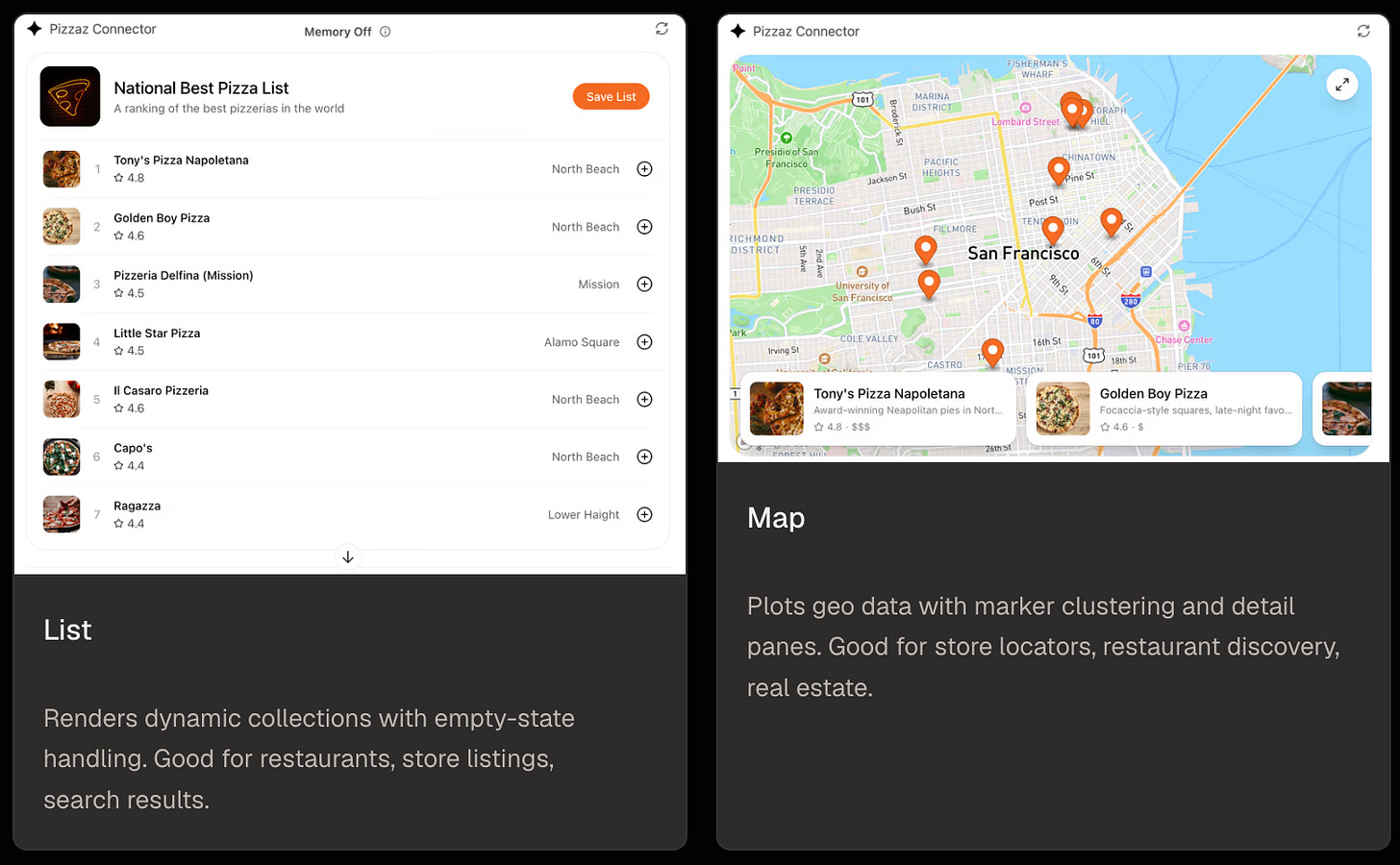
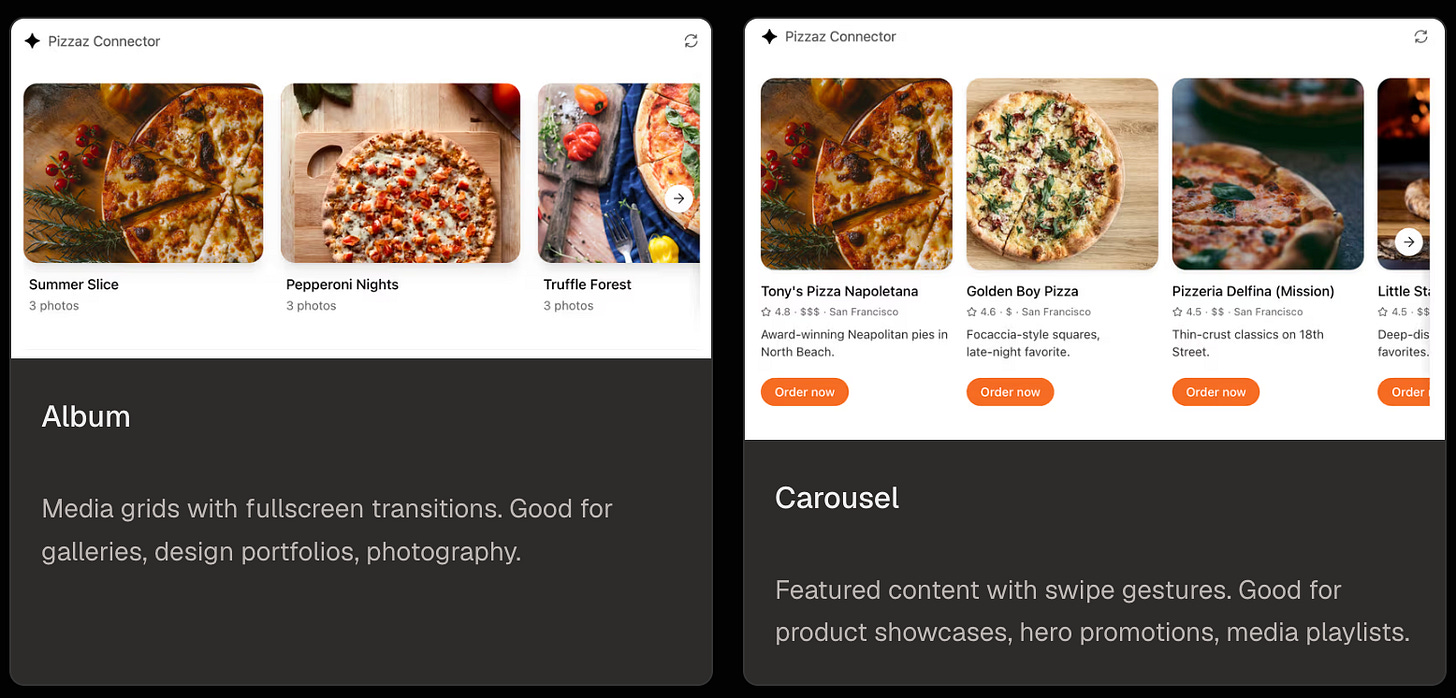
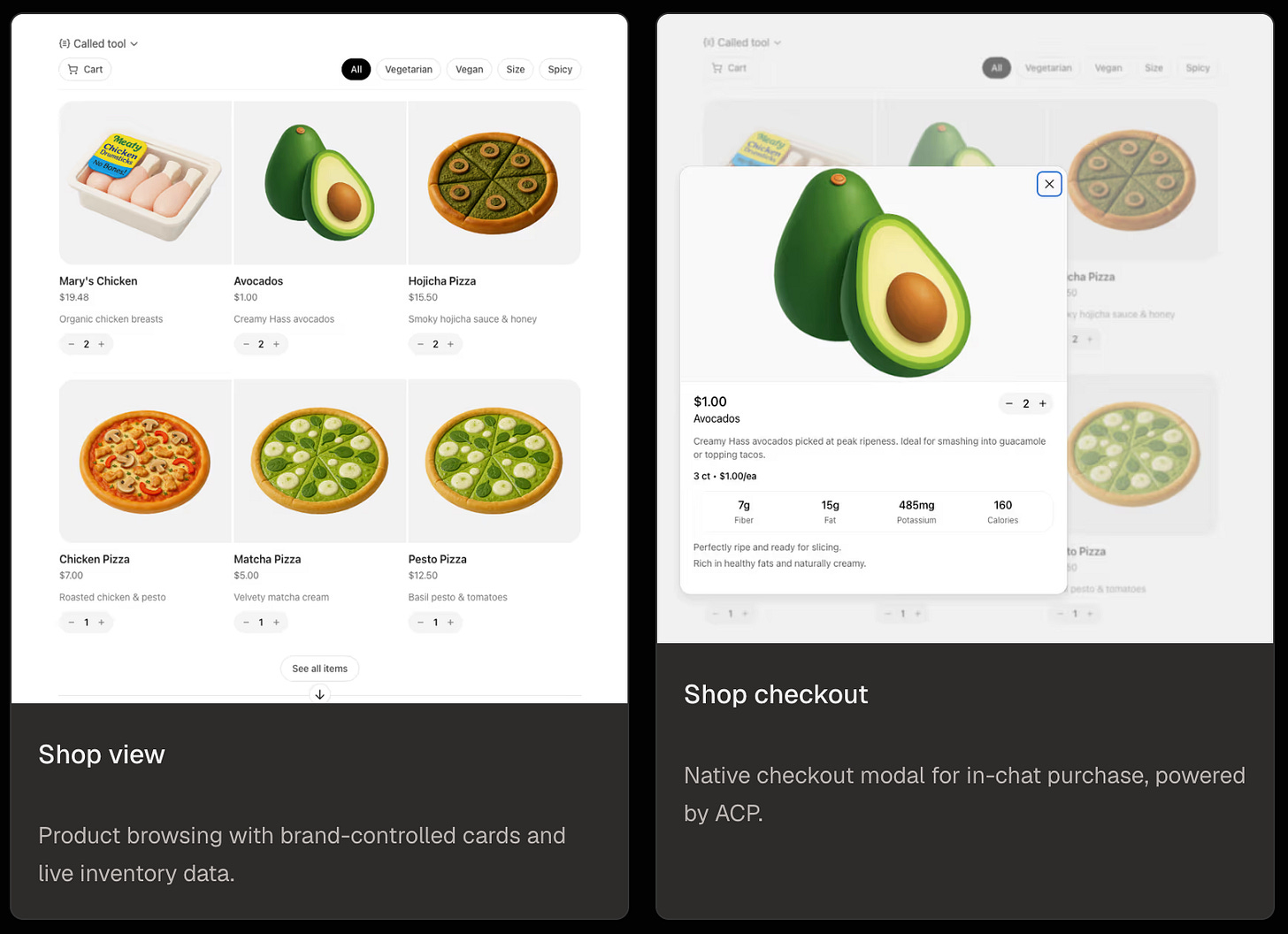
Beyond the reference patterns, every widget is yours to design. The Rankly Merch demo earlier in this post is fully custom: the product card, the carousel of similar items, the store-locator with real-time stock, the embedded full storefront, and the in-chat checkout are all hand-written React components on top of the same Apps SDK primitives. The reference app gives you the grammar. What you build with it is up to you.
Source: OpenAI Apps SDK component reference. Each component runs in an iframe with responsive layout and fullscreen support, so the same primitives scale from an inline card to a full-screen takeover.
What Signals Actually Exist Inside a Chat
Web personalization runs on three primary signals: cookie-based identity, browsing history, and demographic inference. None of those translate cleanly into a chat surface. There are no cookies. The model often does not know who the user is. Browsing history does not exist; conversational history does, but it is session-scoped by default.
In exchange, the chat surface gives you four classes of signal you never had on the open web:
Stated intent
Buyers tell you what they want in plain language. “I need a white linen t-shirt for a beach wedding next month, slim fit, under $100.” That is a richer query than any search bar has produced.
Conversation continuity
The LLM holds the full chat in its window and decides what to pass into your tool calls. Your app persists state across turns by returning IDs (cart, search, session) that the model references on subsequent calls. The model carries the history, your server holds the state, and together they let the same conversation get smarter as it goes.
Locale and rough location
Per the Apps SDK reference, ChatGPT passes the user’s locale in _meta["openai/locale"] and a coarse location hint in _meta["openai/userLocation"] on every tool call. If a user mentions a city or zip in the chat, your app extracts and acts on it directly. Both feed straight into store-locator and inventory queries.
Cross-platform reach
The MCP standard is open. Per the MCP Apps extension spec, the same server that powers your ChatGPT App can power Claude and other MCP clients. Some host-specific behavior remains, but the catalog, cart, and checkout tools are write-once.
Personalization inside a chat surface is intent-driven, context-aware, session-bounded by default, and triggered by language rather than clicks. It rewards depth in four specific layers.
The Four Layers of Personalization
Personalization in a ChatGPT App stacks. Each layer adds a different dimension of context, and they compound. Brand without context renders as a generic carousel. Intent without memory resets every session. Location without intent surfaces irrelevant inventory. The full stack is what makes a chat surface feel personal rather than scripted.
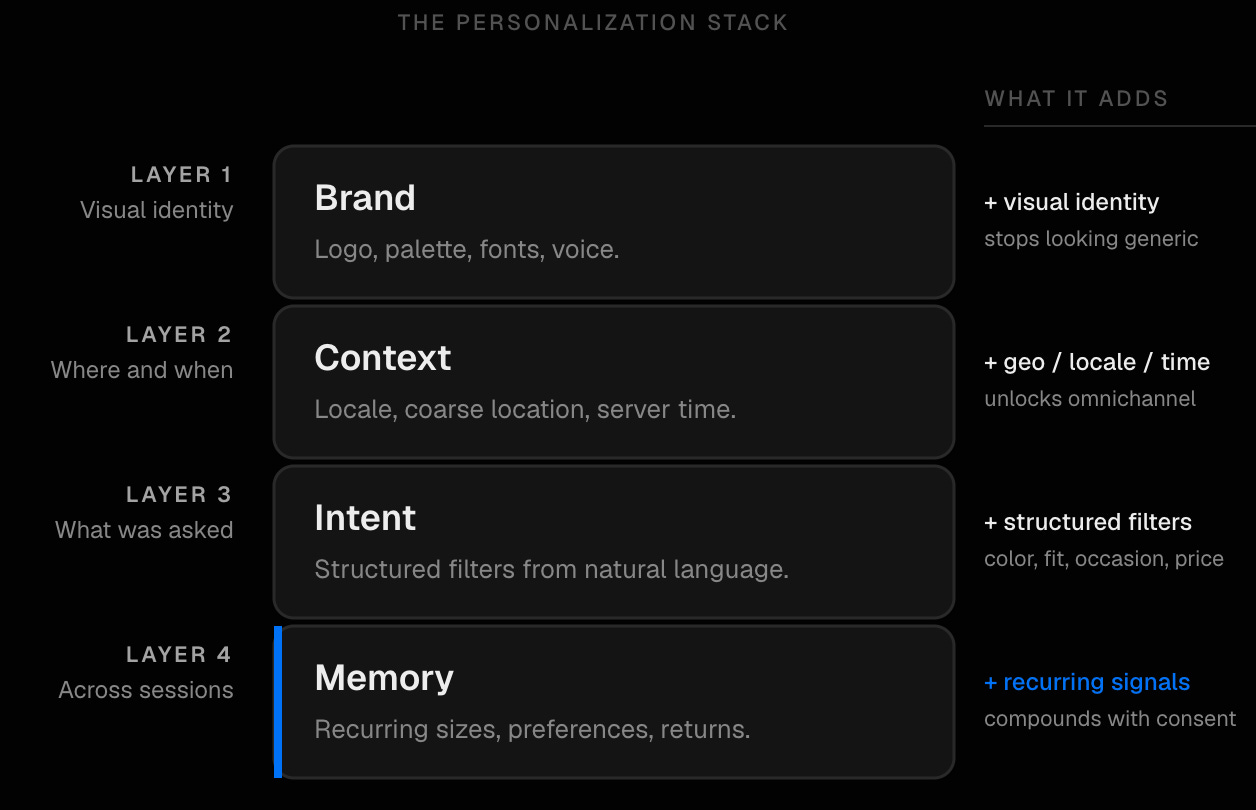
Brand Layer
The storefront speaks in the brand’s voice and renders in the brand’s visual language. That covers the logo, the palette, the fonts, the product copy written in the brand’s tone, and any compliance copy that applies. This is the bare minimum. Skip it and your storefront looks indistinguishable from a generic product carousel rendered by the LLM itself.
Context Layer
When the user opens the app, the MCP server receives locale and a coarse location hint via the Apps SDK metadata. If the user has mentioned a city or zip in the conversation (”I’m in Austin”), the app extracts and stores it for the session. Joined against a store-location graph, that location fact unlocks omnichannel personalization. Time of day matters too. Your server knows the current UTC time, locale gives a rough timezone, and the user often states the time horizon directly (”next month”, “this afternoon”). Inventory pushes vary by hour, fitting-room availability differs between morning and evening, and weekday vs weekend changes which CTAs land.
Intent Layer
The user types a natural-language ask. The app extracts structured intent (color, fabric, occasion, fit, price ceiling, time horizon) and queries the catalog with those filters applied. A single sentence carries far more constraint than a faceted search UI, and the cost of conveying it is zero. The work is in the extraction taxonomy, which is brand-specific. A beauty brand and an apparel brand do not share axes of intent.
Memory Layer
Across sessions, with the user’s consent, prior interactions inform the next one. The buyer is identified by an email or phone they shared previously, which lets the app pull in the sizes they chose, the brands they preferred, the returns they initiated, and the orders that fulfilled. The privacy model is opt-in. For repeat customers, this is the layer that compounds fastest.
An Omnichannel Walkthrough: The Linen T-Shirt
The four layers stack hardest for retailers with both online catalogs and physical stores. Take a US-based casual apparel brand: 1,200 SKUs online, twelve physical stores across major metros, customers who want to know if something is locally available before committing. A buyer opens ChatGPT and types:
“I need a white linen t-shirt for a beach wedding next month, slim fit, under $100. I’m in Austin.”
Here is what happens inside the app we built, layer by layer:
- Brand
The app opens themed to the retailer (primary color, logo, font, voice). The user is never confused about whose store they are in.
- Context
Locale and a coarse location hint arrive via the Apps SDK metadata. “Austin” is extracted from the user’s message and resolved to a coordinate. Combined with the server’s clock and the user’s locale, the app can also infer this is early afternoon on a weekday.
- Intent
The app extracts structured filters from the message. Color is white, fabric is linen, occasion is a beach wedding (formal-casual), fit is slim, price ceiling is $100, time horizon is one month. The catalog returns six SKUs.
- Omnichannel match
The six SKUs are cross-referenced against the store-location graph. Two of them are in stock at the Austin store, 2.3 km from the user’s resolved location.
The carousel that renders inside ChatGPT shows all six products. Two of them carry a contextual badge that the others do not:
Below the carousel, a custom action card appears:
If the user taps the booking card, the app writes the slot back to the retailer’s store-ops system through the same MCP server that runs the catalog tools. If they instead tap a product, the app shows live store-level inventory (”3 in M, 2 in L, last one in S”) refreshed from the WooCommerce feed. None of that is achievable through answer-layer optimization, or through a generic Apps SDK build that does not know the brand has stores. It only happens when the app surface has direct access to a structured location graph and a programmable personalization layer.
See It In Action
The demo below runs against the Rankly Merch ChatGPT App. The user opens the app inside ChatGPT, asks a question, and the answer renders as a row of branded product cards. Each card carries three custom buttons: More Apparel, Stores Near Me, and Open Full Shop. Every card and every button is configurable. The point is that the retailer decides what the user can do next.
Here is the full path the user can take from a single query.
- Ask the question
The user types into ChatGPT and the store app activates. Product cards render in the brand’s palette, with copy in the brand’s voice and three custom CTAs attached to each card.
- Tap More Apparel
Surfaces a similar-products grid for the same intent. Useful when the first answer is close but not exact, or when the user wants to compare a few options before committing.
- Open a product card
Renders the full product detail page inside ChatGPT. Photos, copy, sizes, and live stock all match what is on the website.
- Tap Stores Near Me
Joined against the location graph and the live inventory feed. Shows stores ordered by proximity to the user and tells them whether the selected product is in stock at each one.
- Tap Open Full Shop
Embeds the live website inside ChatGPT for a deeper browse, without breaking the chat session or losing the conversation context.
- Tap Buy Now from the PDP
Native checkout inside ChatGPT, powered by the Agentic Commerce Protocol. The user enters a shipping address and a card, the order is placed, and a confirmation email lands in their inbox. They never leave the chat.
None of this flow is fixed. Each card type, each button, each handoff is a choice. The retailer decides which buttons appear, which screens they open, and how the personalization layers feed into them. That is the whole point of putting the app surface in the brand’s hands instead of leaving it to the LLM’s default rendering. You can personalize the answers however you want.
The Feedback Loop
Every query that lands in the app, including the ones the LLM routes there from organic discovery, is logged with full context. We capture what the user asked, what we surfaced, what they clicked, and whether they checked out. With a POS or CRM integration, in-store fulfillment can flow into the same log. That data joins the same graph that powers visibility analytics. Within a few weeks, a retailer knows not just which queries surface them across LLMs, but which surfaced queries actually convert and which on-app personalization rules are pulling weight.
Feedback flows the other way too. If the visibility layer notices a brand losing share on “linen t-shirts beach wedding” queries to a competitor, the team has the data to adjust. SKUs that are converting get promoted into the carousel, the intent extraction taxonomy gets tuned where the visibility layer flags drift, and local availability surfaces earlier in the conversation. Discovery and conversion data shape each other instead of living in separate dashboards.
Outlook
The Apps SDK and MCP are still early. ACP, the Agentic Commerce Protocol that handles checkout, is shipping fast. UCP, the Universal Commerce Protocol led by Google and Shopify, will reshape catalog interop over the next twelve months. None of that is settled. The shape of the surface is. Brands need to be in the chat, the chat needs to render the brand, and the brand needs to learn from what happens inside it.