This is a continuation of our deep dives on ChatGPT ads and Google AI Mode ads. This time we turn to the new ChatGPT shopping page that launched on March 24, 2026.
What We Did
OpenAI killed its "Instant Checkout" feature in early March 2026 after it failed to gain traction. Only about a dozen Shopify merchants out of millions had actually integrated, users browsed but rarely bought, and OpenAI admitted they had "underestimated how difficult the enablement of transactions was going to be" (CNBC, March 24 2026).
Two weeks later, on March 24, they launched a completely new shopping experience focused on product discovery instead of checkout (OpenAI announcement). They built a dedicated landing page at chatgpt.com/shopping and rolled it out to all Free, Go, Plus, and Pro tier users globally. The shopping page is accessible to ChatGPT users worldwide. What is currently US-only is the merchant onboarding side: stores need to be based in the US and sell to US customers to be eligible to appear in the feed (Retail Dive). Carrefour also launched a full grocery shopping experience inside ChatGPT for 26 million ChatGPT users in France on March 27, which confirms the surface is live in Europe.
We wanted to understand exactly how this new system works under the hood. So we ran 200 shopping-intent queries: 100 on the new shopping page and 100 identical queries on regular chatgpt.com. We captured every XHR request, every SSE event, every product entity, every API endpoint, every model decision, and every metadata field.
The numbers from this study:
- 199 successful queries (99 shopping + 100 regular)
- 13,369 total XHR entries captured
- 5,711 SSE events parsed
- 69 product entities returned (only 6 on the regular page)
- 15 unique feed partners discovered
- 2 live ads captured (Lamps Plus via Criteo, and Wayfair on a re-run)
Here is what we found.
The Landing Page
The new shopping page is essentially a Pinterest-style discovery hub. A search bar at the top says "Shop for anything," followed by a hero banner and a grid of curated prompt cards with lifestyle product images.
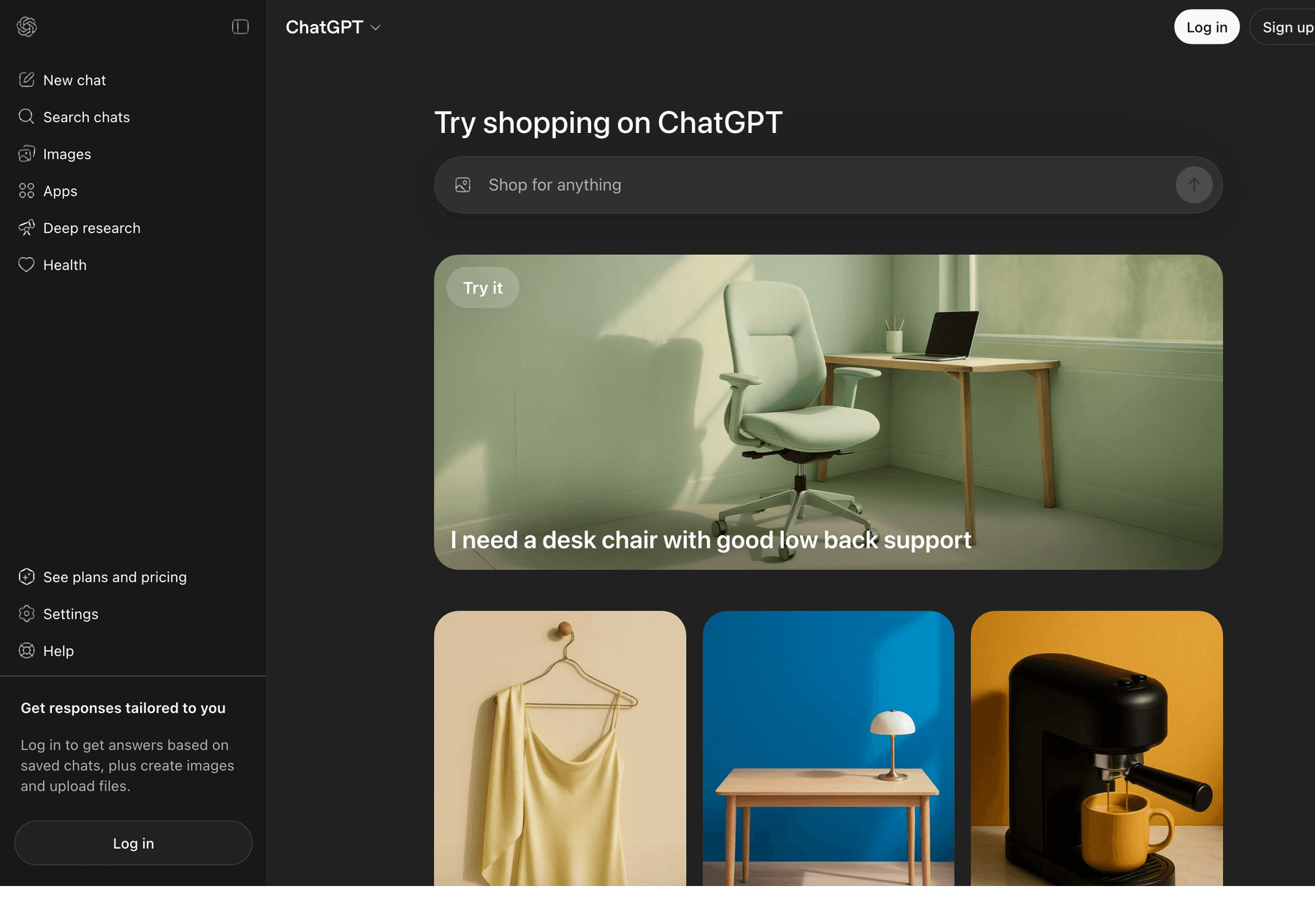
Each prompt card looks like a simple title ("Help me find a home printer," "Find me a gift for my coffee-loving friend") but when you click it, it sends a much more detailed prompt that you never see. These are loaded from a new API endpoint we discovered: /backend-anon/shopping/home. Here is the actual JSON structure:
{
  "groups": [
    {
      "id": "try-shopping-with-chatgpt",
      "title": "Try shopping with ChatGPT",
      "kind": "carousel",
      "system_hint": "search",
      "action": {
        "input_requirements": {
          "who": "none",
          "source": "prompt_only",
          "camera_mode": null
        },
        "strategy": "auto_send"
      },
      "items": [
        {
          "id": "home_printers",
          "title": "Help me find a home printer",
          "prompt_text": "I'm looking to buy a home printer for occasional
            color printing and scanning. Help me compare the best
            options for print quality, reliability, ink costs, and
            ease of use.",
          "image_url": "https://persistent.oaistatic.com/shopping/home/banner/home_printers/2026-03-23-v1.webp"
        }
      ]
    }
  ]
}
The displayed title is "Help me find a home printer" but the actual prompt sent is the much longer version with comparison criteria already baked in. Every card has strategy: "auto_send" which means clicking it immediately sends the prompt to ChatGPT. Two card groups exist: try-shopping-with-chatgpt (a horizontal carousel at the top) and shopping-grid-suggestions (the grid below). All images are served from persistent.oaistatic.com/shopping/home/.
The Core Difference: Same Query, Different Universes
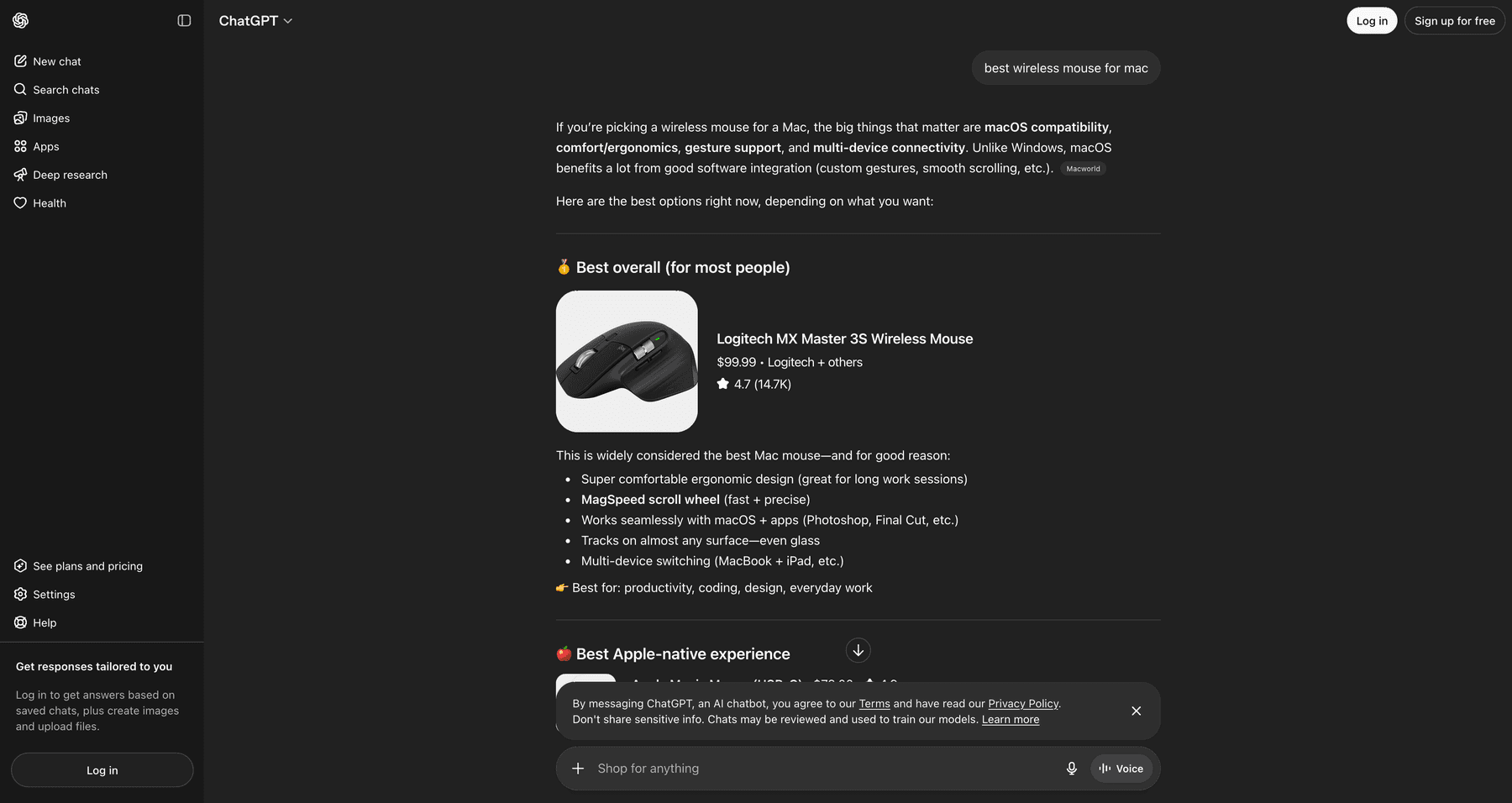
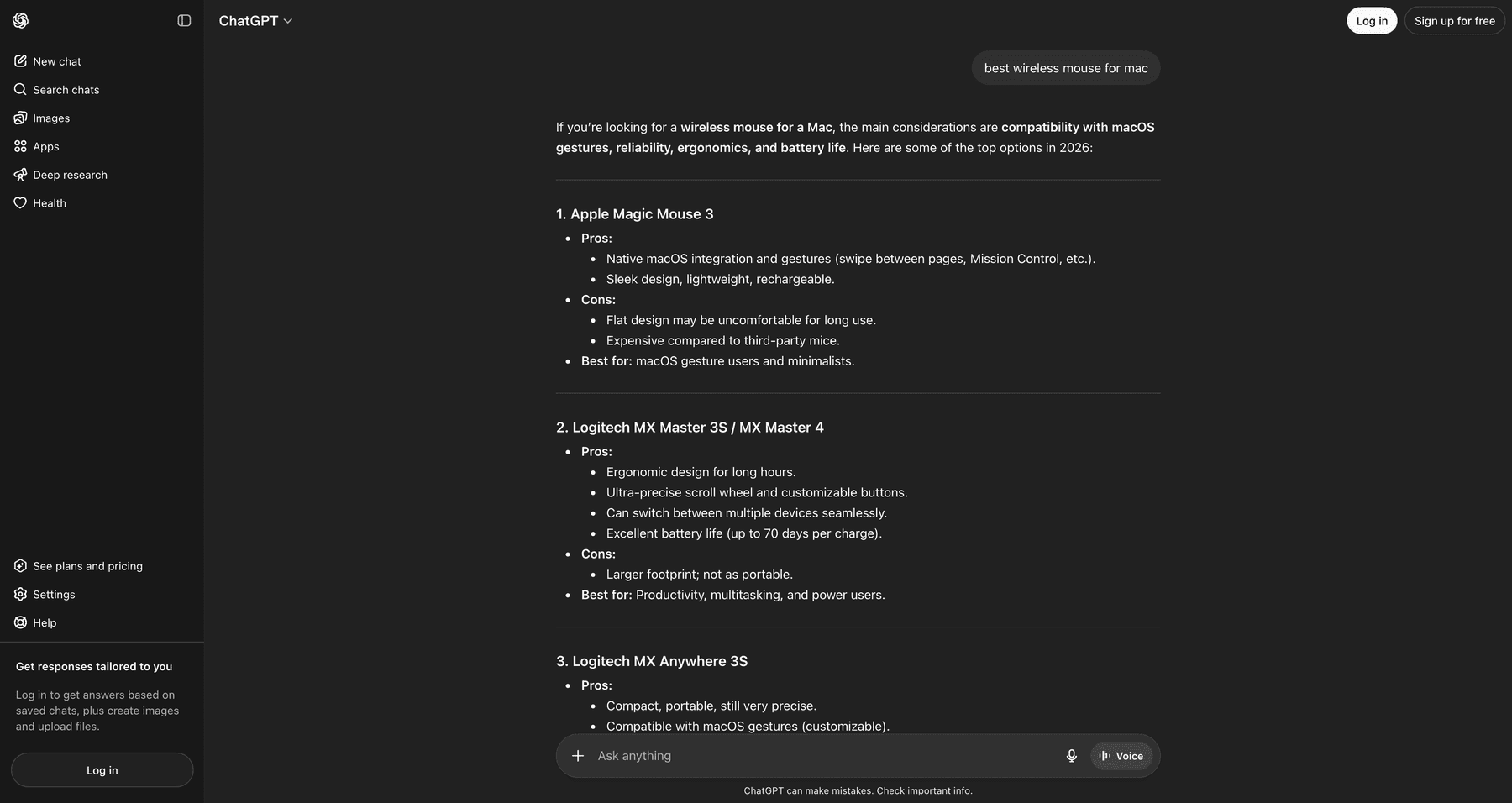
We sent the exact same query, "best wireless mouse for mac", to both pages. The shopping page returned a structured response with a product card showing the Logitech MX Master 3S, complete with image, price, and rating. The regular page returned a text-only answer with no product cards at all.
Shopping page response
Regular ChatGPT response
This is not a small UI difference. The two pages run completely different pipelines. Here are the headline numbers from 200 queries:
| Metric | Shopping Page | Regular Page |
|---|---|---|
| Queries with product cards | 21/99 (21%) | 2/100 (2%) |
| Total products returned | 69 | 6 |
| Total offers | 194 | 19 |
| Comparison tables | 39/99 (39%) | 3/100 (3%) |
| "Browse All" button | 38/99 (38%) | 4/100 (4%) |
| Avg response length (chars) | 2,943 | 2,042 |
| web.run tool invocations | 75 | 12 |
| Total messages in stream | 492 | 313 |
| Live ads captured | 2 (Lamps Plus via Criteo, Wayfair) | 0 |
Shopping page surfaces products on 10x more queries, generates comparison tables 13x more often, and invokes the web search tool 6.25x more often. This is not the same product running with a different UI. It is a fundamentally different backend pipeline.
Three New API Endpoints Only Exist on Shopping
We catalogued every API endpoint hit during all 200 sessions. Three endpoints exist exclusively on the shopping page and are never called from regular ChatGPT:
1. /backend-anon/shopping/home
This is the landing page data API. It returns the entire grid and carousel of curated prompts with their full expanded text, images, and routing strategy. Called once when you load the shopping page.
2. /backend-api/search/product_update
This is the heart of the shopping experience. Called 63 times across 99 shopping queries, only 6 times across 100 regular queries. It is a Server-Sent Events stream that returns product_entity events as the AI is composing the response. Each event contains a fully structured product with title, price, ratings, offers from multiple merchants, image data, and tracking metadata.
3. /backend-anon/search/product_carousel_descriptions
Called 15 times on shopping vs 3 times on regular. Returns AI-generated one-line descriptions for each product in a carousel. Always returns exactly 8 descriptions per call. Here is the actual response format:
{
  "descriptions": {
    "13044288327961418103": "Heavy-duty winter parka with ample insulation for cold climates.",
    "11253100064281698639": "Fitted, warm parka with fusion fit for active winter wear.",
    "4494286602048031555": "Insulated down jacket designed for cold weather protection.",
    "700423594836515249": "Durable down jacket suitable for extreme cold conditions.",
    "9475048469078538444": "Lightweight, high-performance down parka for cold environments.",
    "11785497427591409001": "Packable down jacket ideal for layering in cold weather.",
    "18268962112033053904": "Premium down jacket with high warmth-to-weight ratio.",
    "16541919396042849606": "Affordable extreme down jacket for severe winter conditions."
  }
}
Notice the keys are large numeric product IDs and the values are short marketing descriptions. We also caught the system being location-aware. Some descriptions referenced "Miami" and "Florida" because our scraper's VPN was in Florida. Examples we captured: "Spacious, durable tote for everyday use, ideal for Miami" and "Cooling design ideal for warm Florida nights." The descriptions are generated per session and personalized to the user's detected location.
Model Routing: Three Models, One Brain
Shopping queries are routed across multiple models in a way that regular queries are not.
| Model | Shopping | Regular |
|---|---|---|
| i-5-mini | 45 (45%) | 87 (87%) |
| gpt-5-3 | 26 (26%) | 4 (4%) |
| gpt-5-3-mini | 13 (13%) | 0 |
| gpt-5-mini | 12 (12%) | 4 (4%) |
The model that actually generates product cards, comparison tables, and Browse All buttons is gpt-5-3. We confirmed this with a tight correlation across the dataset:
- All 39 comparison tables on the shopping page came from
gpt-5-3 - All 38 Browse All buttons came from
gpt-5-3 i-5-minigenerated 0 comparison tables and 0 Browse All buttons even on the shopping page
We also caught a brand new model variant gpt-5-3-mini that only appears on shopping queries. It is not documented anywhere publicly.
The model_adjustments field on every message tells us how routing decisions are made. The most common value we saw was:
"model_adjustments": [
  "auto:smaller_model:reached_message_cap"
]
This means anonymous users get auto-downgraded from gpt-5-3 to i-5-mini after hitting a message cap. Logged-in users likely stay on the bigger model longer, which means logged-in users will see far more product cards and comparison tables than anonymous users.
One more routing detail. The server_ste_metadata events showed shopping queries were routed to cluster_region: westcentralus with tool_name: SonicTool and tool_invoked: true. Regular queries went to cluster_region: australiaeast with no tool invoked. Shopping has its own dedicated US cluster.
15 Feed Partners (Most of Which Have Never Been Reported)
Each product offer carries a debug_info object that exposes which data provider it came from. The feed_id field is the most interesting. Here is the complete list of feed IDs we discovered across 200 queries:
| Feed ID | Count | Brand |
|---|---|---|
| openai_etsy | 12 | Etsy (largest partner) |
| openai_best_buy | 10 | Best Buy |
| openai_target | 4 | Target |
| openai_bright_dick_s_sporting_goods | 3 | Dick's Sporting Goods (via Bright) |
| openai_bright_scheels | 2 | Scheels (via Bright) |
| openai_bright_sharkninja | 2 | SharkNinja (via Bright) |
| openai_scheels | 1 | Scheels (direct) |
| openai_bright_crateandbarrel | 1 | Crate & Barrel |
| openai_bright_apple | 1 | Apple |
| openai_bright_lululemon | 1 | Lululemon |
| openai_bright_backcountry | 1 | Backcountry |
| openai_bright_adidas | 1 | Adidas |
| openai_bright_sur_la_table | 1 | Sur La Table |
| hennes_and_mauritz_group_h_and_m_us | 1 | H&M (enterprise integration) |
| poshmark_chatgptenterprise_poshmark | 1 | Poshmark (enterprise integration) |
The naming pattern reveals the integration tier. openai_bright_* means the feed flows through Bright, a third-party data provider that aggregates merchant catalogs. openai_* with no Bright prefix means direct integration. The two longest IDs (hennes_and_mauritz_group_h_and_m_us and poshmark_chatgptenterprise_poshmark) follow a different naming convention that suggests enterprise-tier deals negotiated separately.
OpenAI's public ACP launch announcement listed Target, Sephora, Nordstrom, Lowe's, Best Buy, Home Depot, and Wayfair. We confirmed Best Buy and Target. We never saw Sephora, Nordstrom, Lowe's, Home Depot, or Wayfair as feed_ids in our 200 queries, but they did appear as merchants in the offers (which means they are available through the organic p2 provider, not as direct feed partners).
The Product Entity Schema
Each product entity is a deeply nested JSON object with 29 top-level fields. Here is a stripped-down example from our captures:
{
  "type": "product_entity",
  "product": {
    "id": "16406220612788342393",
    "title": "Soundcore by Anker Q20i Over-Ear Headphones with Active Noise Cancelling, Deep Bass, and 40-Hour Playtime",
    "url": "https://www.bestbuy.com/...?utm_source=chatgpt.com",
    "price": "$44.99",
    "rating": 4.5,
    "num_reviews": 4440,
    "merchants": "Best Buy + others",
    "cite": "turn0product0",
    "show_price_disclosure": false,
    "offers_see_more_boundary": 3,
    "providers": ["product_info"],
    "metadata_sources": ["p1", "p2", "p3"],
    "offers": [
      {
        "merchant_name": "Best Buy",
        "price": "$44.99",
        "available": true,
        "tag": { "text": "Best price", "tooltip": null },
        "details": "In stock online, Free delivery by Tue",
        "provider": "p3",
        "debug_info": {
          "source": "p3",
          "feed_id": "openai_best_buy",
          "p": "132",
          "h": "['best buy']"
        },
        "price_details": {
          "base": "$44.99",
          "shipping": null,
          "tax": null,
          "total": "$44.99"
        },
        "checkoutable": false,
        "checkout_payload": null
      }
    ],
    "showcase_metadata": {
      "image": { "url": "https://i.etsystatic.com/...", "width": 2000, "height": 1500 },
      "background": { "type": "solid", "primary": "#f5f5f5" },
      "slots": {
        "product_square": { "fit": "contain", "image_blend_mode": "darken" },
        "product_portrait_card": { "fit": "contain", "image_blend_mode": "normal" }
      },
      "debug": {
        "strategy": "focus-fit",
        "subject_confidence": 0.84,
        "foreground_area_fraction": 0.68,
        "face": { "detected": false }
      }
    },
    "analytics_meta": { ... }
  }
}
A few observations from the schema. checkoutable and checkout_payload are present on every offer but are always set to false and null. The plumbing for native checkout still exists in the API even though the user-facing feature was killed in March 2026. OpenAI is keeping the door open.
Understanding p1, p2, and p3
Every offer carries a debug_info.source field that identifies which data provider it came from. We saw three values across our 200 queries: p1, p2, and p3. Here is what each one means based on what we observed in the data:
| Provider | What it is | Has feed_id? |
|---|---|---|
| p1 | Metadata enrichment layer. Provides ratings, review counts, and descriptions for products that come from other sources. We saw metadata_sources: ["p1"] on almost every shopping product. As a primary offer source it appeared rarely (3 times in our dataset, AeroPress was one). | No |
| p2 | Organic product graph. ChatGPT pulls these from an aggregated catalog similar to how Google Shopping aggregates products from across the web. No partnership required. Most products on the regular ChatGPT page came from p2. | No |
| p3 | Direct feed partners. These are merchants that have signed onto OpenAI's Agentic Commerce Protocol (ACP) and submit their full product catalog directly to OpenAI as a structured feed. Each p3 offer carries a feed_id that names the partner. | Yes |
The Priority Score (debug_info.p)
The debug_info.p field is a numeric priority score that influences ranking. Higher scores rank higher. Across our dataset:
| Provider | Min | Max | Average |
|---|---|---|---|
| p1 | 160 | 160 | 160 |
| p2 | 100 | 133 | 109 |
| p3 | 100 | 553 | 261 |
p3 (direct feed partners) get priority scores about 2.4x higher than p2 (organic) results, with some p3 scores reaching 553. This is the ranking signal that pushes Etsy, Best Buy, and Target products to the top of the carousel even when more relevant organic results exist.
One important caveat. We do not know if merchants pay OpenAI to be in the p3 feed program, or if it is a free integration that simply gives priority to brands that participate. The XHR data confirms the priority advantage but does not reveal the commercial terms. OpenAI has not publicly disclosed whether p3 placements are paid, revenue-share, or free.
Query Fanouts: search_model_queries
ChatGPT does not just send your query to a search engine. It first generates one or more reformulated search queries (called fanouts) that get sent to the web search tool. These are stored in a metadata field called search_model_queries on the message object.
Here is the structure as it appears in the SSE stream:
"metadata": {
  "search_model_queries": {
    "type": "search_model_queries",
    "queries": [
      "wireless headphones under 200 best 2026"
    ]
  },
  "model_slug": "gpt-5-3",
  "search_turns_count": 1,
  "search_source": "composer_auto"
}
Across the dataset:
- Shopping page: 63 fanout events across 99 queries (64% of queries triggered fanouts)
- Regular page: 8 fanout events across 100 queries (8% of queries)
Shopping queries are 8x more likely to trigger a web search than regular queries. The fanout queries themselves follow two patterns based on which model generates them:
gpt-5-3 generates a single, dense, keyword-stuffed query. Examples we captured:
- "wireless headphones under 200 best 2026"
- "best 4k gaming tv 2026 oled qled 120hz"
- "cooling bed sheets hot sleepers bamboo cotton percale"
gpt-5-mini generates two natural-language queries. Examples:
- "best winter jackets for extreme cold" + "top extreme cold weather jackets review"
- "best office chair for back pain" + "top ergonomic office chairs for back pain features recommendations"
The most common words across all fanouts: "best" (55x), "2026" (30x), "for" (20x), "under" (11x), "reviews" (7x). The model heavily appends the current year and the word "best" to maximize relevance signal in the search results it gets back.
The Image Pipeline: Face Detection on Product Images
This was one of the more surprising findings. Every product on the shopping page has a showcase_metadata object that contains detailed image processing data. ChatGPT runs computer vision on every product image before serving it.
Here is the actual structure:
"showcase_metadata": {
  "image": {
    "url": "https://i.etsystatic.com/...",
    "width": 2000,
    "height": 1500
  },
  "background": {
    "type": "solid",
    "primary": "#f5f5f5"
  },
  "slots": {
    "product_square": {
      "fit": "contain",
      "image_blend_mode": "darken"
    },
    "product_portrait_card": {
      "fit": "contain",
      "image_blend_mode": "normal"
    }
  },
  "debug": {
    "strategy": "focus-fit",
    "subject_confidence": 0.84,
    "foreground_area_fraction": 0.68,
    "face": {
      "detected": false,
      "primaryBox": { "x": 0, "y": 0, "width": 0, "height": 0 },
      "primaryCenter": { "x": 0, "y": 0 }
    },
    "focus_box": { "x": 0.2, "y": 0.15, "width": 0.6, "height": 0.7 },
    "focus_center": { "x": 0.5, "y": 0.5 }
  }
}
The pipeline does several things on every image:
- Face detection. The
face.detectedflag and the bounding box coordinates tell us OpenAI runs face recognition. Out of 21 products with showcase metadata in our first batch, only 1 had a face detected. This matters for fashion and apparel where the model needs to crop around the face for portrait cards. - Subject confidence scoring.
subject_confidenceranges from 0 to 1. Products in our dataset averaged 0.84 with a min of 0.71. This is a quality score for how well-isolated the product is from its background. - Background detection.
background.typewas always "solid" in our data, with the dominant color extracted as a hex code. This is used to set the card's background color so it blends with the product image. - Multiple slot types. Each image gets rendered for two slots:
product_squareandproduct_portrait_card. Each slot has its ownimage_blend_mode(we saw both "normal" and "darken"). - Three rendering strategies.
focus-fit,contain, andclean-subject-cover. The strategy is chosen automatically based on the subject confidence score.
The image CDN sources reveal where OpenAI gets the images from. On the shopping page, 25 product images came from i.etsystatic.com (Etsy's own CDN), 10 from images.openai.com (re-hosted by OpenAI), 6 from pisces.bbystatic.com (Best Buy's CDN), and a few from CloudFront and Amplience. Etsy images are served directly from Etsy. Best Buy images are served directly from Best Buy. OpenAI does not always re-host them.
Live Ads Captured on chatgpt.com/shopping
One of the biggest findings. Out of 199 queries in our main run, we caught exactly one live ad and it was on the shopping page. The query was "best wall art for living room modern." The advertiser was Lamps Plus. The ad was served via Criteo.
Then we re-ran the same query a few hours later and caught a different ad on the same surface: a Wayfair sponsored placement. Same query, different advertiser. This tells us the ad system rotates advertisers across requests rather than serving the same brand to every user.
Here is the actual screenshot of the Wayfair ad as it appears in ChatGPT shopping. Notice the full AI response with the comparison table, the "Explore more" carousel, and then the clearly labeled "Sponsored" ad card at the very bottom:
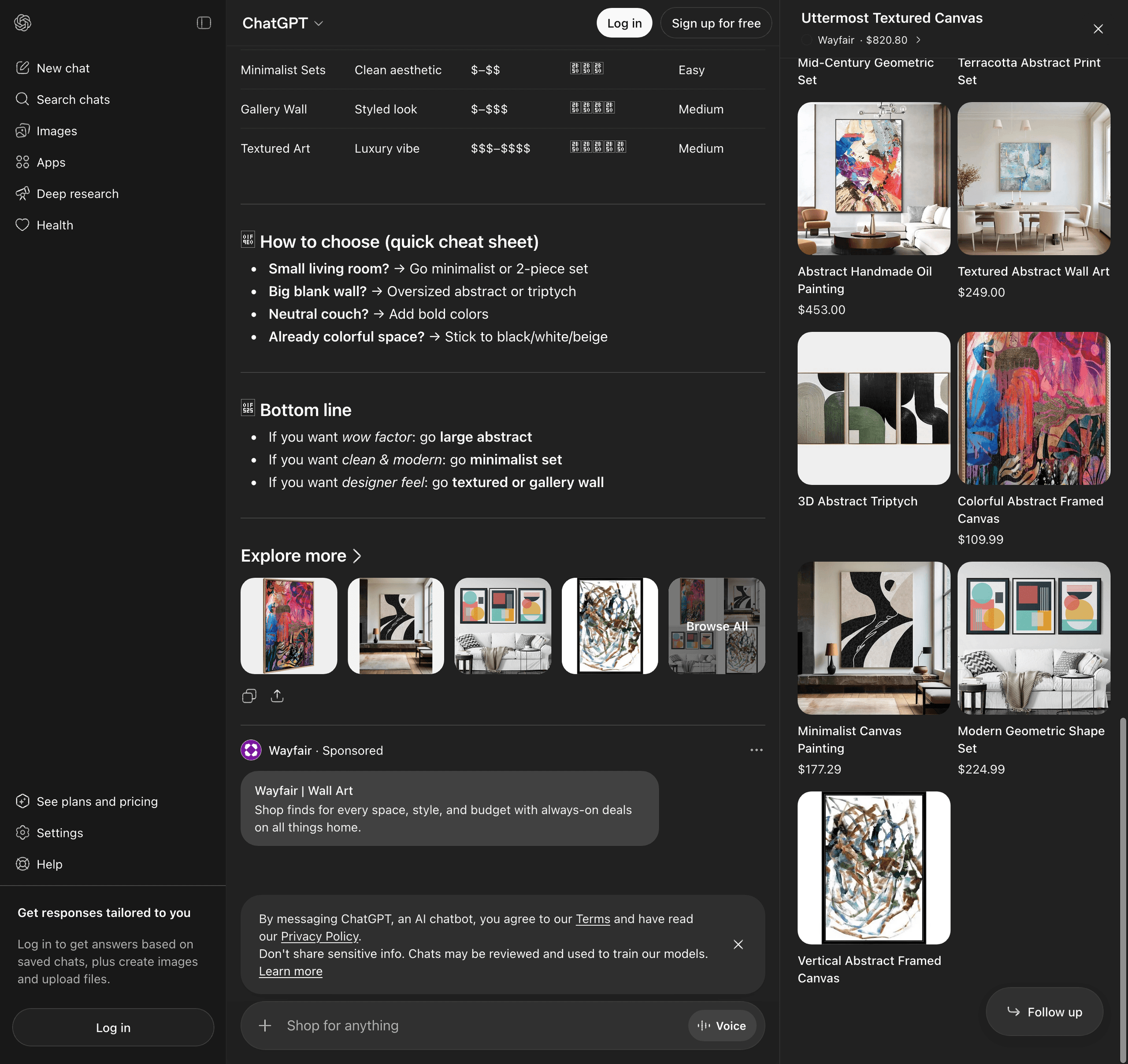
Criteo is the ad tech partner OpenAI publicly named earlier this year as the first official integration for ChatGPT ads. We had seen the announcement, but until our Lamps Plus capture we had never actually intercepted a Criteo ad serving in production. The XHR payload below is the original Lamps Plus capture, which is the most complete view we have of what an ad looks like on the wire.
Here is the Wayfair ad data extracted from the rendered DOM. It uses the same single_advertiser_ad_unit structure we documented in the original Lamps Plus capture:
{
  "type": "ads",
  "content": {
    "ads_request_id": "(unique per request)",
    "ads_spam_integrity_payload": "gAAAAAB...",
    "type": "single_advertiser_ad_unit",
    "preamble": "",
    "advertiser_brand": {
      "name": "Wayfair",
      "url": "https://www.wayfair.com/",
      "favicon_url": "https://bzrcdn.openai.com/d5d49fa8bdd90967.ico",
      "id": "adacct_..."
    },
    "carousel_cards": [
      {
        "title": "Wayfair | Wall Art",
        "body": "Shop finds for every space, style, and budget with always-on deals on all things home.",
        "target": {
          "type": "url",
          "value": "(Criteo /aclk redirect URL)",
          "open_externally": false
        },
        "image_url": "https://bzrcdn.openai.com/...",
        "ad_data_token": "..."
      }
    ]
  },
  "visibility": { "status": "allowed", "reason": null },
  "debug_info": null
}
The brand favicon is hosted on bzrcdn.openai.com (OpenAI's dedicated ad asset CDN). The same domain that hosted the Lamps Plus assets we caught in the original run. We covered this CDN in our earlier ChatGPT ads blog.
The original Lamps Plus capture (which we caught during the main 200-query run) had a fully resolved click URL pointing to cat.us.criteo.com/delivery/ckwcaoa.aspx with the standard Criteo tracking parameters (cto_oac, cto_ad, cto_ca, etc.). That is the Criteo delivery endpoint that Criteo uses across all of their dynamic retargeting ads. The flow: Criteo's server logs the click, then redirects to the advertiser's product page. This confirms Criteo is the ad tech layer powering ChatGPT shopping ads, which matches what OpenAI publicly announced earlier this year.
This confirms a few things:
- The Criteo + OpenAI integration is live in production on the shopping page, not just in pilot tests
- Ads on the shopping page use the same
single_advertiser_ad_unitformat we documented in our ChatGPT ads research - Multiple advertisers (Lamps Plus, Wayfair) can serve ads on the same query, which suggests the system rotates advertisers across requests
- Both Lamps Plus and Wayfair are existing Criteo customers, so any brand running Criteo retargeting may already be eligible to appear in ChatGPT shopping ads
- The ad fill rate is roughly 1 in 99 queries on the shopping page
What This Means for Brands
The ChatGPT shopping page is a fundamentally different surface from regular ChatGPT. If you are a brand thinking about AI-driven commerce, the implications are big.
- Two pipelines, two different optimizations. The same query returns radically different results on the two pages. If you optimize for organic ChatGPT visibility, you are not automatically optimizing for the shopping page. They run different models, hit different endpoints, and surface different products.
- Direct feed integration matters more than ever. Products from p3 feed partners (the ones submitted directly through OpenAI's ACP) get priority scores 2.4x higher than organic p2 results. If you are not in the ACP feed pipeline (either directly or through Bright), you are competing against products that have a structural ranking advantage.
- Etsy is dominant. Etsy was the most-cited feed partner with 12 occurrences, more than any other brand. Etsy's catalog (long-tail, unique, image-rich, well-tagged) is exactly what the shopping page is optimized to surface. Brands with similar long-tail catalogs should pay attention.
- Image quality is now a ranking signal. The showcase_metadata pipeline runs face detection, subject confidence scoring, and background analysis on every product image. Images with low subject confidence scores get rendered with the "contain" strategy (smaller in the card) instead of "focus-fit" or "clean-subject-cover". Brands should audit their product photography for clean backgrounds and well-isolated subjects.
- Ads are coming, slowly. The first Criteo ad in production confirms the ad system works. The 1% fill rate confirms it is still being rolled out cautiously. Brands running Criteo retargeting campaigns may already be eligible to appear in ChatGPT shopping ads without doing anything new.
- Native checkout is still in the schema. Even though Instant Checkout was killed in March, the
checkoutableandcheckout_payloadfields are still present on every offer object. OpenAI is keeping the door open to bring it back, possibly through merchant Apps like Walmart's.