This is a continuation of our previous deep dive on ads in ChatGPT. This time we turn to Google AI Mode.
What We Did
Google AI Mode has been rolling out ads since late 2025, with shopping ads appearing in AI-generated responses for US-based users. Google has said there is no separate ad platform for AI Mode. Your existing Shopping, Search, and Performance Max campaigns are automatically eligible. But what does this actually look like under the hood?
We tested 8 shopping-intent queries using our own LLM scraper, targeting known Google AI Mode ad partners like Petco, Wayfair, e.l.f. Cosmetics, and Rugs USA. Two out of eight queries returned live ads. We captured the full page DOM, all XHR requests, and the ad element structure.
There Is No Separate Ad System
This is the most important takeaway. Google AI Mode ads use the exact same infrastructure as regular Google Shopping ads. The click tracking URL uses /aclk (the same endpoint used by every Google ad click since the beginning). The tracking parameter is gclid (Google Click ID), the same identifier you already see in your Google Ads reports.
What Google actually built is a new placement surface. Think of it like how Shopping ads can appear on the Google Search results page, on YouTube, or in the Discover feed. AI Mode is just another surface. The ad auction, bidding, billing, and product feed data all flow through the same system.
If you are already running Shopping or Performance Max campaigns, your products are eligible to show in AI Mode without any extra configuration. The ad disclosure we captured confirms this directly: "Ads are ranked based on a number of factors, including advertiser bid and ad quality."
The Queries and Results
We tested 8 queries. Two returned ads:
| Query | Ad? | Advertisers |
|---|---|---|
| best pet food for puppies | No | - |
| best affordable makeup brands | No | - |
| best carry on luggage for travel | No | - |
| best area rugs for living room | Yes | Rugs.com, Birch Lane, Wayfair, AllModern |
| best vintage home decor online | No | - |
| best affordable furniture for apartment | Yes | Wayfair, Anabei, Living Spaces, Castlery |
| best wireless headphones under $100 | No | - |
| best running shoes for beginners | No | - |
That is a 25% fill rate, significantly higher than what we saw with ChatGPT ads (~5%). Both queries that triggered ads were in the home/furniture category.
Query 1: "best area rugs for living room" (Full Page)
Here is the complete page from query to ad. The organic product cards (Loloi, Safavieh, Nuloom, Mercury Row, Revival Rugs) appear inline within the AI response. The "Sponsored" ad carousel sits at the very bottom, below the "Ask anything" box, separated by a horizontal line.
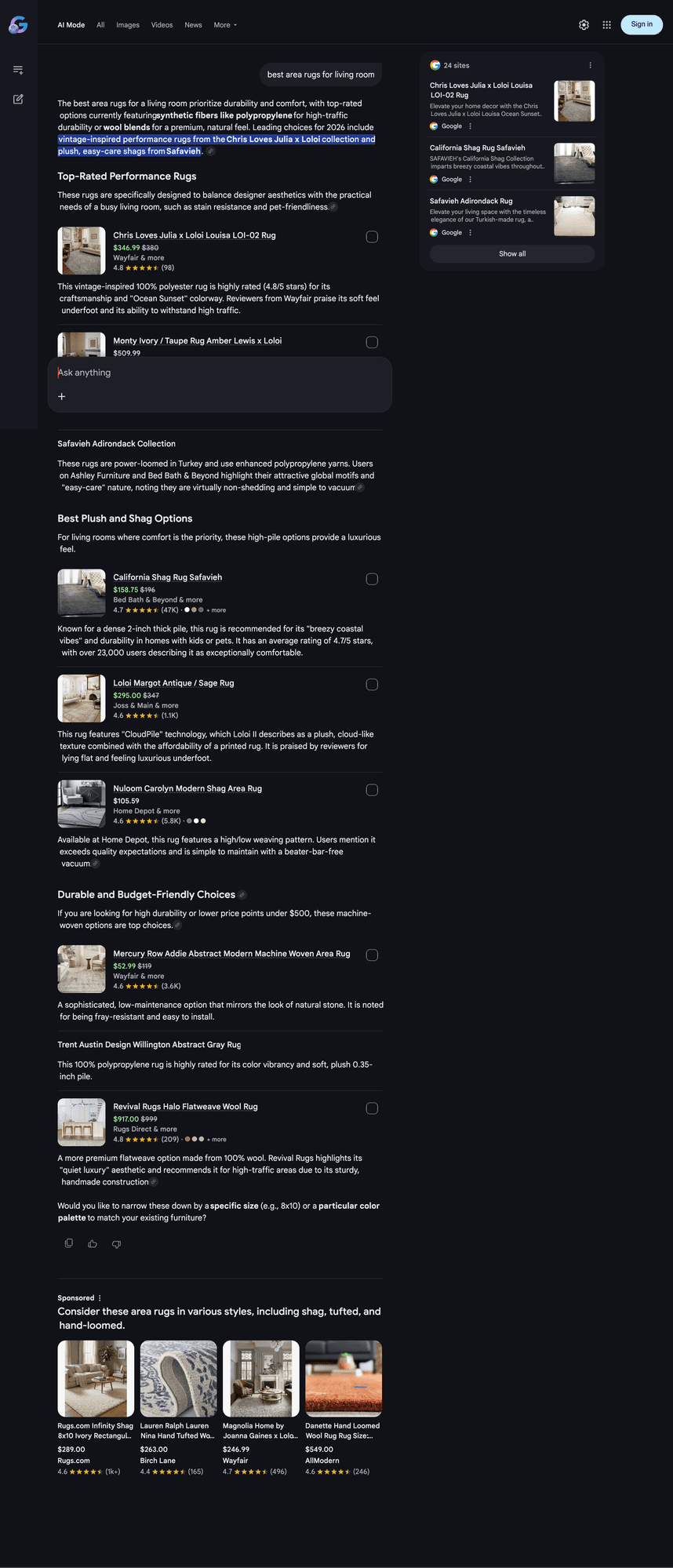
Image resized to show the full page in a single view
The ad is labeled "Sponsored" with a three-dot menu, followed by AI-generated contextual copy: "Consider these area rugs in various styles, including shag, tufted, and hand-loomed." It contains 4 product cards: Rugs.com Infinity Shag ($289), Lauren Ralph Lauren from Birch Lane ($263), Magnolia Home from Wayfair ($246.99), and Danette Hand Loomed Wool from AllModern ($549).
Query 2: "best affordable furniture for apartment" (Full Page)
Same pattern. The AI response covers retailers (IKEA, Wayfair, Target, Article, Nathan James), shows organic product cards (Futon $134, Loveseat $253.99, Sectional $185.89), gives shopping tips, and then the "Sponsored" ad appears at the bottom.
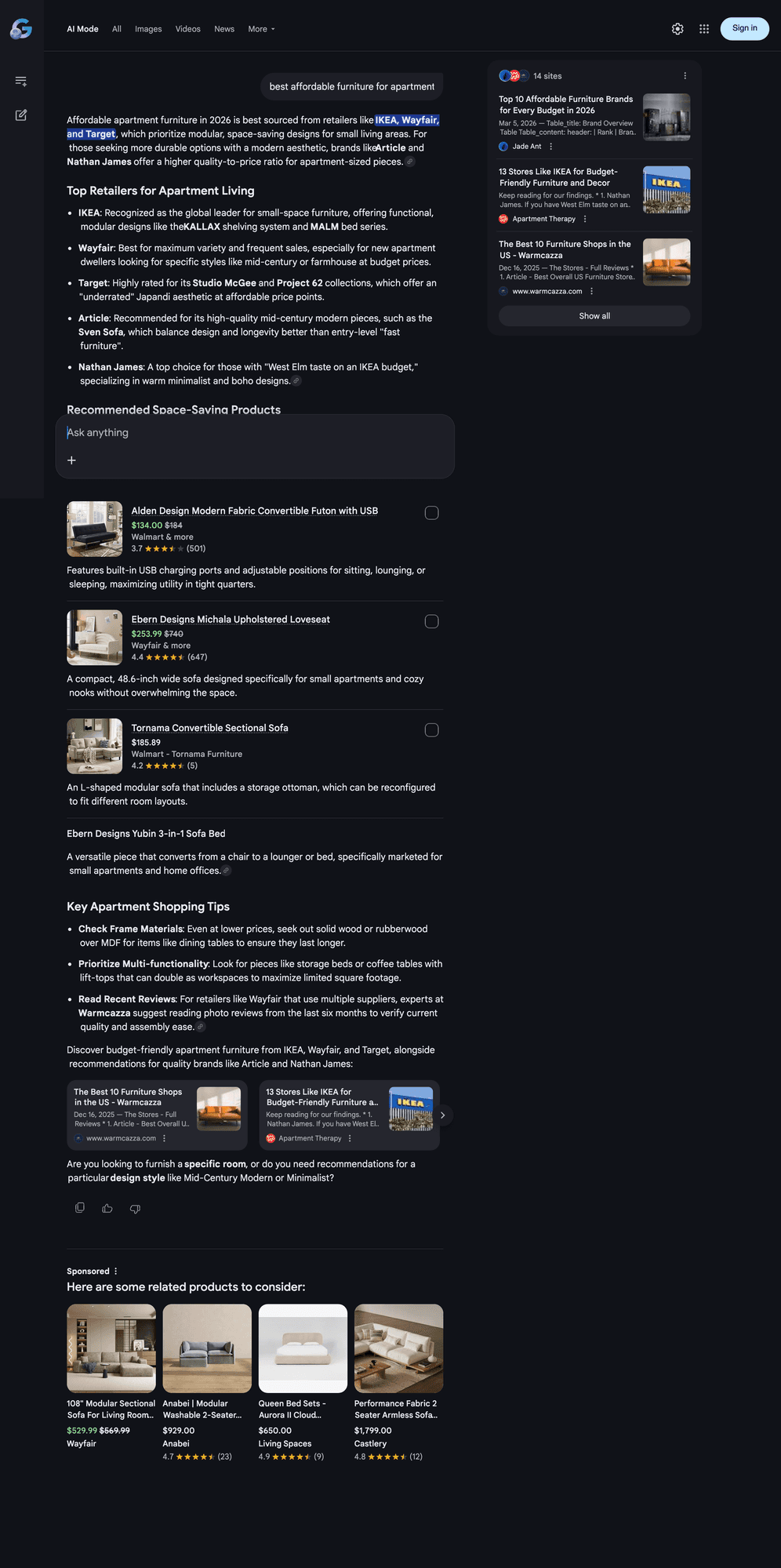
Image resized to show the full page in a single view
This ad reads: "Here are some related products to consider:" with products from Wayfair ($529.99), Anabei ($929), Living Spaces ($650), and Castlery ($1,799). Same format, same placement, different AI-generated intro copy.
Organic Product Cards vs Ads
Google AI Mode shows two types of product listings, and they are completely separate:
| Aspect | Organic Product Cards | Ads |
|---|---|---|
| Position | Inline within the AI response text | Below the response, after a separator line |
| Label | No label | "Sponsored" with three-dot disclosure menu |
| Data source | Google Shopping Graph (Merchant Center feeds) | Google Ads auction (Shopping/PMax campaigns) |
| Click tracking | Standard organic click | /aclk with gclid |
| Intro copy | Part of the AI response | AI-generated contextual copy (e.g., "Consider these...") |
| Card data | Title, price, merchant, rating, image | Title, price (current + original), merchant, rating, review count, image |
The organic product cards pull from Google's Shopping Graph, the same data source behind regular Google Shopping results. This data comes from product feeds submitted through Google Merchant Center. The ads, on the other hand, are selected through the Google Ads auction based on advertiser bid and ad quality.
Organic Shopping Card HTML
Here is the actual DOM structure of an organic product card (Chris Loves Julia x Loloi Louisa at $346.99):
<div class="AtG8Cb pSg9dc jlGWrc">
  <div class="Vod43d">
    <div class="TGe1zc">
      <!-- Product title -->
      <div class="UOyaYc fXRQ6b VZf7Cf" data-xid="">
        Chris Loves Julia x Loloi Louisa LOI-02 Rug
      </div>

      <!-- Price (current + original strikethrough) -->
      <div class="tuBCJd">
        <span class="hkdwEc"
          aria-label="$346.99. Was $380.">
          $346.99
        </span>
        <span class="RHPjke" aria-hidden="true">
          $380
        </span>
      </div>
    </div>

    <!-- Merchant -->
    <div class="GlITL">
      Wayfair
      <span class="vVde9">& more</span>
    </div>

    <!-- Rating -->
    <div class="izBqlb">
      <div class="QJQYGf">
        <div class="Y3n7td">4.8</div>
        <span role="img"
          aria-label="Rated 4.8 out of 5, 98 reviews."
          class="AOcwXd" />
        <div class="lCwGdd">(98)</div>
      </div>
    </div>
  </div>
</div>| Class | Element |
|---|---|
| AtG8Cb | Card container |
| UOyaYc fXRQ6b VZf7Cf | Product title with data-xid identifier |
| hkdwEc | Current price (with aria-label for accessibility) |
| RHPjke | Original price (strikethrough) |
| GlITL | Merchant name |
| vVde9 | "& more" multi-merchant indicator |
| Y3n7td | Numeric rating value |
| AOcwXd | Star rating visual (CSS gradient-based) |
| lCwGdd | Review count |
Ad Card HTML
And here is the ad container. Notice the "Sponsored" label, the disclosure panel, and the AI-generated contextual copy that wraps the product cards:
<div class="OpjAlc"
  data-ved="2ahUKEwib-oyS9M2TAxV2mS..."
  data-hveid="CBAQAA">

  <div class="KN3Lmf">
    <!-- "Sponsored" label -->
    <span class="Z2KOX js2yJb">Sponsored</span>

    <!-- Three-dot disclosure menu -->
    <div class="SbYtc H4yF6b">
      <div class="DGckob">
        <svg><!-- vertical ellipsis icon --></svg>
      </div>
      <!-- Expandable disclosure panel -->
      <div class="DjTr3e d15Xx">
        <div class="Ffi3C">
          Why you're seeing this ad unit
        </div>
        <div class="lAQ6ve">
          These are ads. Ads are paid and are always
          labeled with "Ad" or "Sponsored". They're
          ranked based on advertiser bid and ad quality...
          <span class="jfkPCc">Learn more</span>
        </div>
      </div>
    </div>
  </div>

  <!-- AI-generated contextual ad copy -->
  <div>Consider these area rugs in various styles,
    including shag, tufted, and hand-loomed.</div>

  <!-- Ad product cards (same fields as organic,
       but click URLs use /aclk with gclid) -->
  <div data-xid="">
    <img class="HkNHyd" src="..." />
    <div>Rugs.com Infinity Shag 8x10 Ivory...</div>
    <div class="hkdwEc">$289.00</div>
    <div class="GlITL">Rugs.com</div>
    <div class="Y3n7td">4.6</div>
    <div class="lCwGdd">(1k+)</div>
  </div>
  <!-- ... 3 more product cards -->
</div>
The product card fields inside the ad (title, price, merchant, rating, review count) use the same CSS classes as the organic shopping cards (hkdwEc, GlITL, Y3n7td, lCwGdd). The only differences are the OpjAlc wrapper, the "Sponsored" label, and the click URL switching from a standard link to /aclk?gclid=....
What Matches Standard Google Ads Exactly
We scraped a real Google Shopping ad on regular Search and on the Shopping tab for the same query, then compared every parameter against the AI Mode ad. Here is what we found:
| Parameter | Google Search Shopping Ad | AI Mode Ad |
|---|---|---|
| URL path | /aclk | /aclk |
| sa | L | L |
| ai | DChsSEwiQ6pH... | DChsSEwj97Zu... |
| co | 1 | 1 |
| gclid prefix | EAIaIQob... | EAIaIQob... |
| gclid length | 55 chars | 55 chars |
| cid prefix | CAAS0wHk... | CAASugHk... |
| cce | 2 | 2 |
| sig prefix | AOD64_... | AOD64_... |
| ctype | 5 | 5 |
| ved prefix | 2ahUKEwj... | 2ahUKEwi... |
Every single parameter is identical in format, prefix, and encoding. The gclid always starts with EAIaIQob, is always 55 characters, and uses the same Base64 encoding. The sig always starts with AOD64_. The ctype=5 (Shopping ad click type) is the same on both surfaces.
This is not "similar infrastructure." This is the exact same code path. When a Shopping ad click happens in AI Mode, it goes through the same billing, attribution, and conversion tracking pipeline as a Shopping ad click on regular Google Search. The only AI Mode-specific addition is the OpjAlc wrapper class and the AI-generated contextual ad copy.
For comparison, ChatGPT's organic product cards come from a different pipeline: the /backend-api/search/product_update endpoint with providers labeled p2 (organic) and p3 (direct feed partners like openai_best_buy and openai_walmart).
Ad DOM Structure
Unlike ChatGPT, which delivers ads as a separate SSE event (type: "ads") in a streaming response, Google renders the ad directly into the page DOM as HTML. There is no separate API call for the ad. It is server-side rendered as part of the page.
This has a practical implication: in ChatGPT, if a user sends a new message before the ad event arrives in the stream, the ad gets suppressed (ChatGPT checks whether the ad's message ID matches the latest prompt). In Google AI Mode, the ad is already part of the rendered page. It stays visible until the user navigates to a new query, at which point the entire page reloads.
Here is the DOM structure of the ad container:
<div class="OpjAlc" data-ved="..." data-hveid="...">
  <span class="Z2KOX js2yJb">Sponsored</span>

  <!-- Three-dot disclosure menu -->
  <div class="SbYtc H4yF6b">
    <svg><!-- vertical ellipsis icon --></svg>
    <div class="DjTr3e d15Xx">
      <!-- "Why you're seeing this ad unit" panel -->
      <div class="lAQ6ve">
        These are ads. Ads are paid and are always
        labeled with "Ad" or "Sponsored"...
      </div>
    </div>
  </div>

  <!-- AI-generated contextual ad copy -->
  <div>Consider these area rugs in various styles,
    including shag, tufted, and hand-loomed.</div>

  <!-- Product cards (4 per carousel) -->
  <div data-xid="">
    <img class="HkNHyd" src="..." />
    <div>Rugs.com Infinity Shag 8x10 Ivory...</div>
    <div>$289.00</div>
    <div>Rugs.com</div>
    <div>4.6 stars (1k+)</div>
  </div>
  <!-- ... 3 more product cards -->
</div>| Element | Class | Purpose |
|---|---|---|
| Ad container | OpjAlc | Main wrapper with data-ved and data-hveid tracking attributes |
| Sponsored label | Z2KOX js2yJb | <span> containing the "Sponsored" text |
| Disclosure menu | SbYtc H4yF6b | Three-dot menu that opens "Why you're seeing this ad unit" |
| Disclosure text | lAQ6ve | The ad transparency explanation |
| Product card | data-xid | Individual product listing with image, title, price, merchant, rating |
What About Multi-Advertiser Ad Carousels?
In our ChatGPT ad analysis, we found two ad unit types in the code: single_advertiser_ad_unit (one brand, one or more carousel cards) and multi_advertiser_ad_unit (multiple brands in a single ad block). The multi-advertiser format has not gone live yet in ChatGPT, but it exists in the code and is structurally similar to how Google's shopping carousel already works.
Google AI Mode's ad carousel already supports multiple brands in a single ad unit by default. In both of our captured ads, the 4 product cards came from different merchants (Rugs.com, Birch Lane, Wayfair, AllModern in one; Wayfair, Anabei, Living Spaces, Castlery in the other). This is effectively a multi-advertiser carousel, but Google does not treat it as a separate ad format. It is simply how Shopping ads work: Google runs the auction, selects the winning products from different advertisers, and renders them together in one "Sponsored" block.
This is a key architectural difference. ChatGPT is building distinct ad unit types (single_advertiser_ad_unit vs multi_advertiser_ad_unit) as separate formats with different rendering logic. Google already has this built in because Shopping ads have always aggregated products from multiple merchants into a single result block. For Google, there is nothing new to build. For ChatGPT, it is still a feature in progress.
Click Tracking
Every product card in the ad links to a /aclk URL. This is the same ad click endpoint Google has used for years across all its ad surfaces. Here is the structure:
/aclk?sa=L
  &ai=DChsSEwj97ZuW9M2TAxXMMAgFHZiKBDkYACICCA...
  &co=1
  &gclid=EAIaIQobChMI_e2blvTNkwMVzDAIBR2YigQ5...
  &cid=CAASugHkaLBa45fAiQ77p_0HhU3QtfHfYfTLeJ5j...
| Parameter | Purpose |
|---|---|
| sa | Source attribution type |
| ai | Encrypted ad identifier containing campaign, ad group, and creative data |
| gclid | Google Click ID. The same tracking parameter used in all Google Ads, visible in your Google Ads reports and Google Analytics |
| cid | Encrypted campaign/creative ID |
| co | Click origin flag (1 = user-initiated click) |
The gclid is the critical field. It means that AI Mode ad clicks show up in your existing Google Ads reporting with the same conversion tracking, attribution, and analytics you already use. You do not need to set up any new tracking for AI Mode.
Compare this to ChatGPT, which uses a completely separate tracking system: /bazaar/event endpoint with custom oppref and olref encrypted tokens. OpenAI advertisers currently receive only weekly CSV reports with no conversion tracking or demographic breakdowns.
Ad Disclosure
The three-dot menu next to the "Sponsored" label opens a disclosure panel with the heading "Why you're seeing this ad unit". The full text reads:
"These are ads. Ads are paid and are always labeled with 'Ad' or 'Sponsored'. They're ranked based on a number of factors, including advertiser bid and ad quality. Ad quality includes relevance of the ad to your search term and the website the ad points to. Some ads may contain reviews. Reviews aren't verified by Google, but Google checks for and removes fake content when it's identified."
This is stored in a <div class="lAQ6ve"> element inside the disclosure panel. The disclosure confirms the auction-based ranking model: ads compete based on both bid amount and quality score, the same system that powers all of Google Ads.
ChatGPT Ads vs Google AI Mode Ads
Having now intercepted both systems, here is a direct comparison:
| Aspect | ChatGPT | Google AI Mode |
|---|---|---|
| Ad delivery | Separate SSE event (type: "ads") | Server-rendered HTML in page DOM |
| Click tracking | /bazaar/event with encrypted tokens | /aclk with gclid (standard Google Ads) |
| Ad platform | New standalone system with $200K minimum | Existing Google Ads (Shopping/PMax/Search) |
| Fill rate (our test) | ~5% (1 out of 20) | ~25% (2 out of 8) |
| Conversion tracking | Weekly CSV reports only | Full Google Ads reporting + Google Analytics |
| Ad CDN | bzrcdn.openai.com | Standard Google image CDN |
| Stale ad handling | Suppressed if user sends new message mid-stream | Stays visible until page reload |
| Contextual copy | Empty preamble field (not yet used) | AI-generated intro ("Consider these...") |
| Advertiser onboarding | Invite-only through agencies (Omnicom, WPP, Dentsu) | Automatic if running Shopping/PMax campaigns |
How to Prepare for Ads in AI Mode
Based on what we found in the DOM, here are specific signals and actions brands should take:
1. Your Merchant Center feed is your ad creative
The ad cards pull directly from your product feed. The title, price, sale price, rating, review count, and product image all come from Merchant Center. The AI-generated ad copy ("Consider these area rugs in various styles...") is written by Google, but the product data is yours. If your feed has poor titles, missing ratings, or low-quality images, your ad will look worse than competitors in the same carousel. We saw products with 1k+ reviews and 4.6+ ratings getting featured. Products with low review counts or missing ratings were absent.
2. Strikethrough pricing gets prominent placement
Both of our captured ads featured products with original_price and sale_price displayed (the hkdwEc class for current price, RHPjke for strikethrough). Products showing a discount stood out visually. If you run promotions, make sure your sale prices are correctly set in your Merchant Center feed so the strikethrough renders.
3. The "& more" merchant indicator matters
Organic product cards showed a vVde9 class element displaying "& more" next to the merchant name, indicating the product is available from multiple retailers. Products available from more merchants appeared to rank higher in both organic and ad placements. Multi-merchant availability is a signal of product demand.
4. Ad quality score is confirmed in the disclosure
The ad disclosure explicitly states: "ranked based on advertiser bid and ad quality. Ad quality includes relevance of the ad to your search term and the website the ad points to." This is the same Quality Score system from Google Ads. Landing page experience, ad relevance, and expected click-through rate all factor in. Optimizing these for regular Shopping ads will directly improve your AI Mode ad placement.
5. You do not control the AI-generated ad copy
The contextual intro line ("Consider these area rugs..." or "Here are some related products to consider:") is entirely generated by Google's AI. You cannot write or edit it. This means your product title and image carry even more weight since those are the only elements you control. Make sure your product titles are clear, descriptive, and include key attributes (material, size, style) that the AI can reference.
What This Means for Brands
Google's approach is the opposite of OpenAI's. While OpenAI built a brand-new ad system from scratch (new CDN, new tracking, new advertiser accounts), Google plugged AI Mode into the ad infrastructure that has existed for over a decade. For advertisers, this means:
- No new setup required. If you are running Shopping or Performance Max campaigns, you are already eligible for AI Mode placements.
- Full attribution. The
gclidmeans AI Mode clicks flow into your existing Google Ads reporting, Google Analytics, and any conversion tracking you have in place. - Higher fill rate. Google is showing ads more frequently than ChatGPT in our testing (25% vs 5%), likely because they have a much larger pool of advertisers already running Shopping campaigns.
- Contextual ad copy is AI-generated. The intro lines ("Consider these area rugs...") are generated by Google's AI to match the query context. Advertisers do not write this copy.
For brands that are not yet running Shopping or PMax campaigns, this is a strong signal to start. AI Mode is reaching 75 million daily active users, and your products can appear in these conversational responses without any additional cost or configuration beyond what you already invest in Google Ads.
Google is also expanding AI Mode ads with Direct Offers, a pilot that lets advertisers present exclusive promotional offers to users showing purchase intent. Early partners include Petco, e.l.f. Cosmetics, Samsonite, and Shopify merchants. The Universal Commerce Protocol (UCP) now powers purchases from Etsy and Wayfair directly inside AI Mode.
At Rankly, we are building an Ad Intelligence module that will track ad placements across both ChatGPT and Google AI Mode. As conversational AI becomes a major shopping surface, brands need visibility into which competitors are showing up, what queries trigger ads, and how the ad landscape evolves across platforms. Stay tuned.