Overview
Microsoft Copilot is not just a chatbot bolted onto Bing. It is a multi-layered orchestration system that combines OpenAI's GPT models, Microsoft's Bing search index, and the Microsoft Graph (your organization's data) into a single AI-powered search experience. Whether you are using the consumer version in Edge or the enterprise version inside Word, Teams, or Outlook, the same core architecture powers every response.
At the heart of this system sits the Prometheus model, Microsoft's proprietary technology that bridges Bing's real-time web index with GPT's reasoning capabilities. Prometheus is what makes Copilot different from a raw ChatGPT wrapper: it grounds every response in fresh, retrieved data rather than relying on the model's potentially stale training knowledge.
This post walks through the complete architecture: how queries get processed, how the orchestrator manages the search and reasoning loop, how grounding works across consumer and enterprise variants, and how Microsoft's defense-in-depth safety system filters both inputs and outputs.
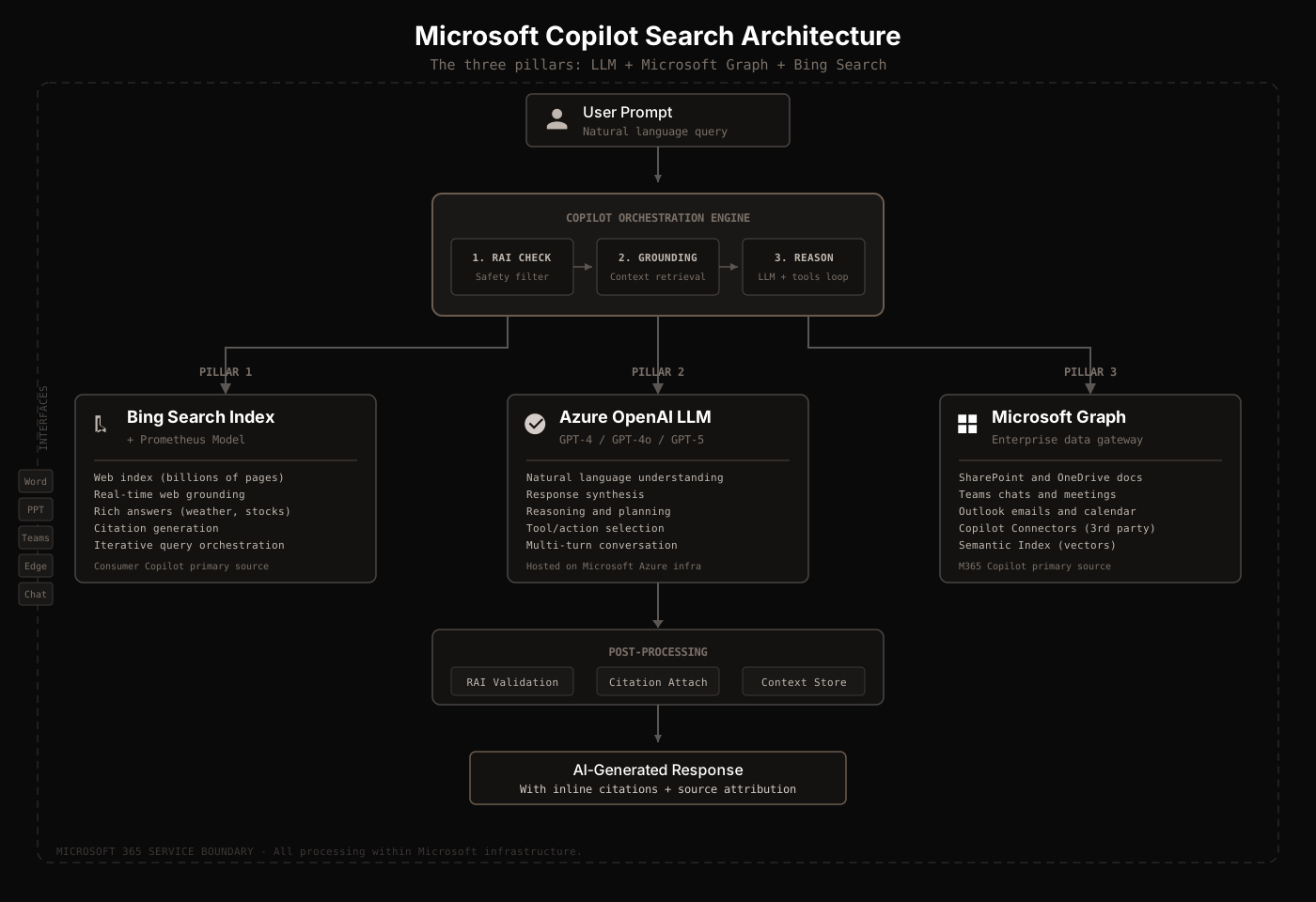
The Three Pillars
Every Copilot response is built on three foundational components working together:
1. Azure OpenAI LLM
Microsoft hosts OpenAI's GPT-4, GPT-4 Turbo, GPT-4o, and GPT-5 series models on its own Azure OpenAI infrastructure. This is not OpenAI's public API. Microsoft runs the models within its own data centers, maintaining full control over data residency and processing. As of January 2026, Anthropic models are also available as a subprocessor for certain workloads.
2. Bing Search Index
Bing provides the real-time web data layer. For consumer Copilot, Bing is the primary data source. For enterprise M365 Copilot, Bing is an optional supplementary source that admins can enable or disable. Copilot never crawls live websites directly. It only uses Bing's pre-indexed content to prevent data exfiltration attacks.
3. Microsoft Graph
Microsoft Graph is the gateway to organizational data. It surfaces content from SharePoint, OneDrive, Teams, Exchange (emails, calendar, contacts), and third-party sources via Graph connectors. This is what makes enterprise Copilot fundamentally different from consumer Copilot: it can search your organization's internal data with the same AI capabilities used for web search.
| Pillar | Consumer Copilot | M365 Copilot |
|---|---|---|
| LLM | GPT-4o / GPT-5 via Azure | GPT-4o / GPT-5 via Azure |
| Bing Search | Primary data source | Optional (admin-controlled) |
| Microsoft Graph | Not used | Primary data source |
The Prometheus Model
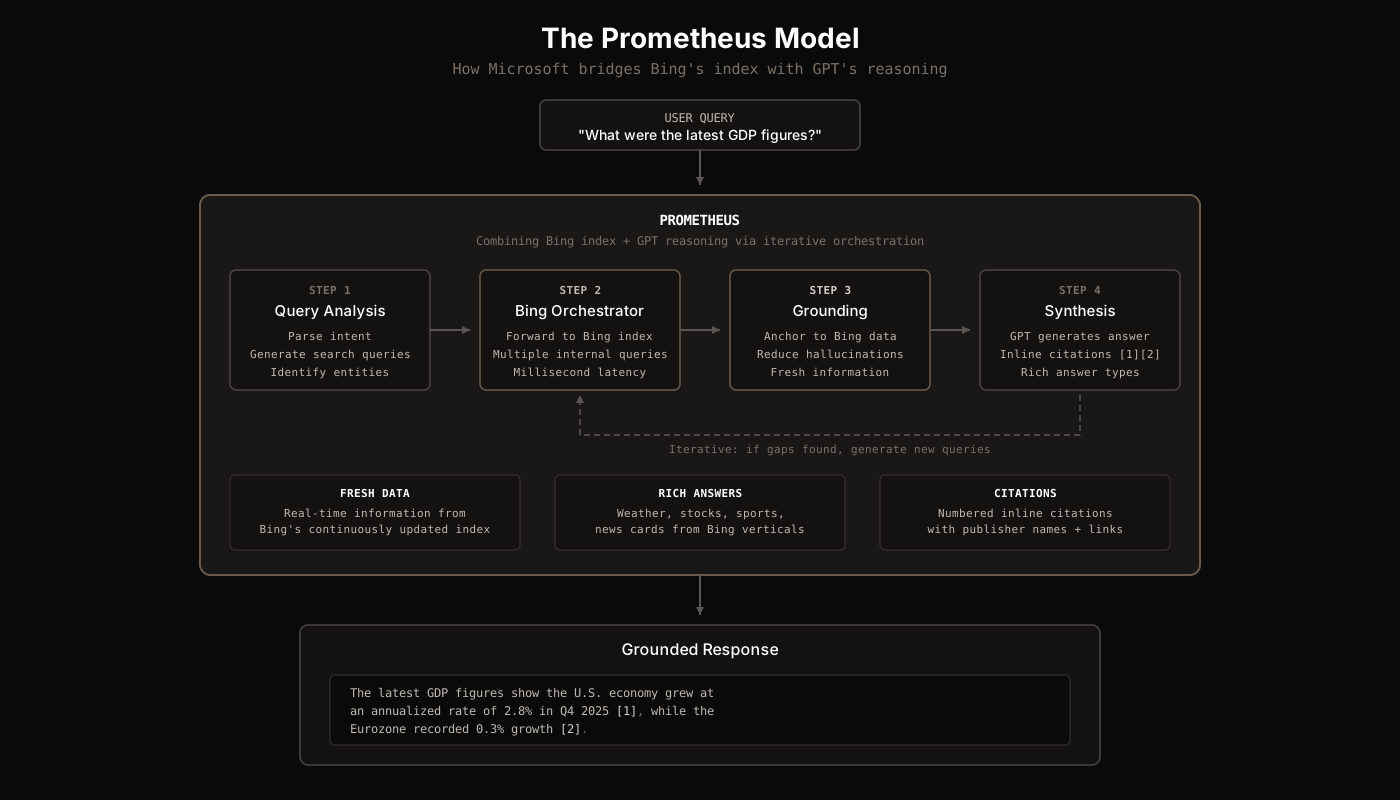
Prometheus is Microsoft's proprietary AI model that sits between the user and the raw Bing index + GPT models. Microsoft describes it as a "first-of-its-kind AI model that combines the fresh and comprehensive Bing index, ranking, and answers results with the creative reasoning capabilities of OpenAI's most-advanced GPT models."
The Bing Orchestrator
At the core of Prometheus is the Bing Orchestrator. This component routes queries through the Bing index and GPT in an iterative loop:
- Simple queries (like "weather in NYC") are forwarded directly to Bing's index for instant answers.
- Complex queries are routed to the GPT model, which generates multiple internal search queries as needed. These sub-queries are fed back through Bing, and the results are synthesized.
- The entire routing process operates in milliseconds, providing an "accurate and rich answer for the user query within the given conversation context."
Grounding Mechanism
The critical innovation of Prometheus is grounding: the model "reasons over the data provided by Bing and hence it's grounded by Bing data, via the Bing Orchestrator." This serves three purposes:
- Fresh information: The model can answer questions about events that happened after its training cutoff because Bing's index is continuously updated.
- Reduced hallucinations: By anchoring responses to real retrieved data, the model is less likely to fabricate information.
- Verifiable citations: Since the response is based on specific sources, Prometheus can generate inline numbered citations that link back to the original pages.
Rich Answer Integration
Prometheus also attaches relevant Bing search answer types to the response. When you ask about weather, stocks, sports scores, or breaking news, Prometheus pulls structured data from Bing's specialized vertical indexes and integrates them as rich cards alongside the conversational answer.
Query Processing
When a user enters a prompt, Copilot does not send it directly to GPT or Bing. The query goes through several preprocessing stages:
Intent Detection
Copilot uses Natural Language Understanding (NLU) to parse the text, identify key entities (dates, locations, names, product references), and determine user intent. It supports multi-intent recognition through what Microsoft calls generative orchestration, an LLM-driven planning layer that can break complex requests into multiple sub-tasks.
Query Reformulation
The system rewrites and optimizes user queries before searching. For web search specifically, Copilot generates a short Bing query consisting of "a few words informed by the user's prompt". It does NOT send the user's entire prompt to Bing. The generated query strips out:
- The user's full prompt text (unless it is very short)
- Any Microsoft 365 file contents
- Identifying information (username, domain, tenant ID)
This is a critical privacy design: Bing never sees the full context of what the user is working on. It only receives a sanitized, minimal search query.
Function Matching
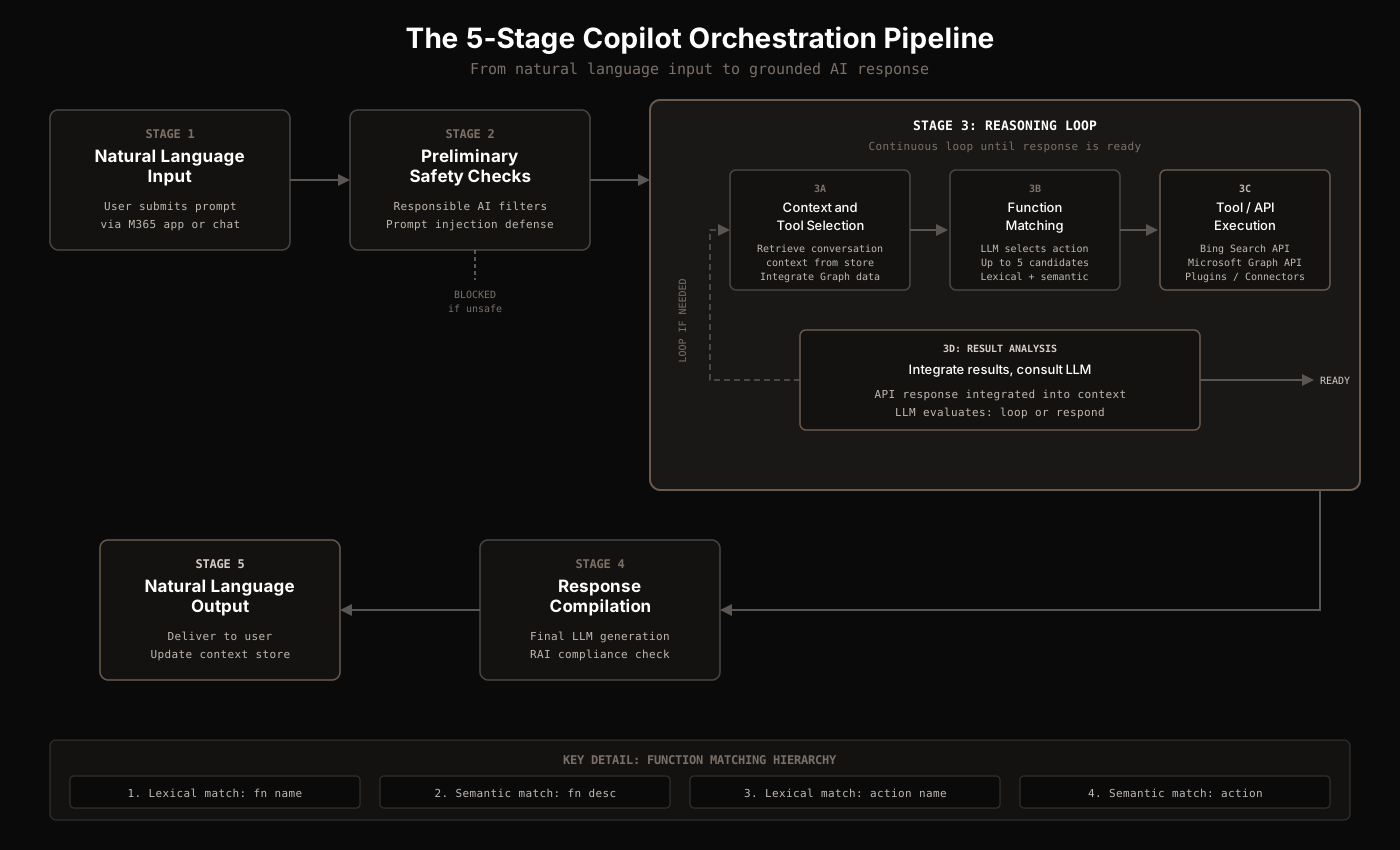
The orchestrator also determines which tools and actions to invoke. It uses a four-level matching hierarchy:
| Priority | Match Type | What It Matches |
|---|---|---|
| 1 | Lexical match | Function name |
| 2 | Semantic match | Function description |
| 3 | Lexical match | Action name |
| 4 | Semantic match | Action name |
The orchestrator fills up to five function candidate slots using this hierarchy. The LLM then evaluates these candidates and selects the optimal action with its parameters.
The 5-Stage Orchestration Pipeline
The orchestrator is the central coordination engine between user input, data sources, and LLM output. Every Copilot interaction passes through five stages:
Stage 1: Natural Language Input
The user submits a prompt through any Copilot interface: the chat panel, an M365 app (Word, Teams, Outlook), or the Edge sidebar.
Stage 2: Preliminary Safety Checks
Before any processing begins, Responsible AI filters evaluate the input for harmful content, prompt injection attempts, and cross-prompt injection attacks (XPIA). If the query fails these checks, the interaction is terminated immediately.
Stage 3: The Reasoning Loop
This is the core of the orchestration engine. It operates as a continuous reasoning loop with four sub-steps:
- 3A: Context & Tool Selection: Retrieve conversation context from the context store, integrate Microsoft Graph data, refine context, and forward to the LLM for guidance.
- 3B: Function Matching: The orchestrator creates a prompt with the user query + context + available actions. The LLM evaluates and specifies the optimal action/function with parameters.
- 3C: Tool Execution: Construct the API request and securely retrieve information. This could be a Bing Search API call, a Microsoft Graph query, a plugin invocation, or a connector call.
- 3D: Result Analysis: Integrate the API response into context, consult the LLM. If more data is needed, loop back to 3A. If the response is ready, proceed to Stage 4.
Stage 4: Response Compilation
All gathered information is compiled and submitted to the LLM for final response generation. The output goes through another round of Responsible AI compliance checks.
Stage 5: Natural Language Output
The final response is delivered to the user. The interaction is logged to the context store for multi-turn conversation continuity.
Known Limitations
The orchestrator has a documented limitation: declarative agents may stop responding when 3 or more different API actions are triggered in a single user turn. Microsoft is moving toward a "federation of focused agents" model, where a parent Copilot directs traffic to specialized sub-agents based on user intent.
Grounding: Anchoring Responses to Real Data
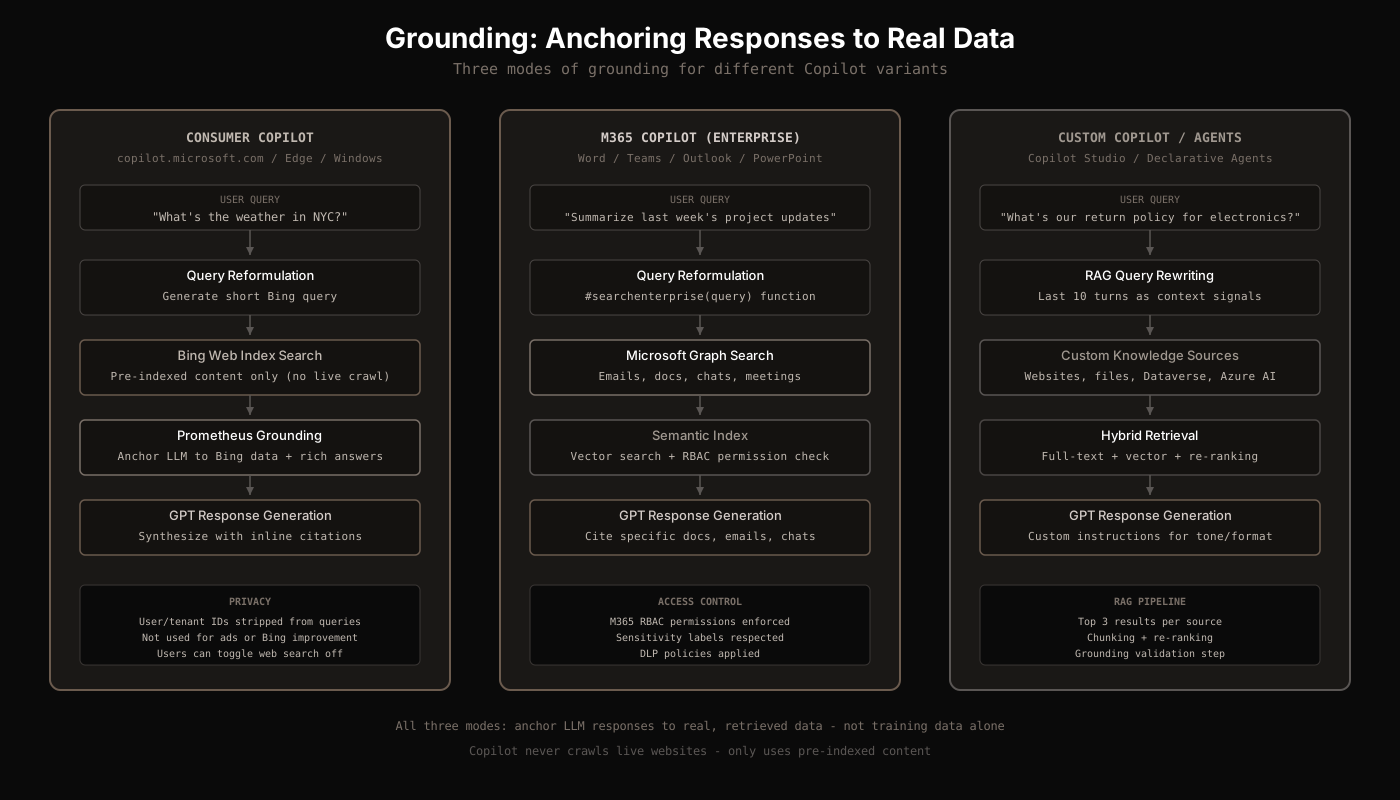
Microsoft defines "grounding" as anchoring Copilot's responses to specific, real data sources rather than relying solely on the LLM's training data. This is the core principle that separates Copilot from a generic AI chatbot. There are three distinct grounding modes:
1. Consumer Copilot: Grounded to Bing
The consumer version (copilot.microsoft.com, Edge sidebar, Windows) is grounded to Bing's web index. The Prometheus model generates a short search query, retrieves results from Bing's pre-indexed content, and synthesizes a response with inline citations. User and tenant identifiers are stripped from all queries sent to Bing. These queries are treated as customer confidential information and are NOT used to improve Bing, create advertising profiles, or train AI models.
2. M365 Copilot: Grounded to Microsoft Graph
Enterprise Copilot is primarily grounded to the user's Microsoft 365 tenant data. It accesses Microsoft Graph to retrieve relevant organizational context: emails, documents, Teams chats, meeting transcripts, and contacts. The data is then retrieved through the Semantic Index (vector embeddings for meaning-based retrieval) and appended to the user's prompt before sending to the LLM.
Critically, data access is always scoped to the signed-in user's permissions. Copilot can only find and surface content that the user already has access to through M365 role-based access controls. Sensitivity labels, DLP policies, and information barriers are all respected.
3. Custom Copilot: Grounded to Custom Data
Through Copilot Studio, organizations can build custom agents grounded to specific datasets, websites, uploaded files (stored in Dataverse, up to 512 MB per file, max 500 files per agent), Dataverse tables (max 15), or Azure AI Search indexes. These use a full RAG pipeline with query rewriting, hybrid retrieval, and re-ranking.
The RAG Pipeline
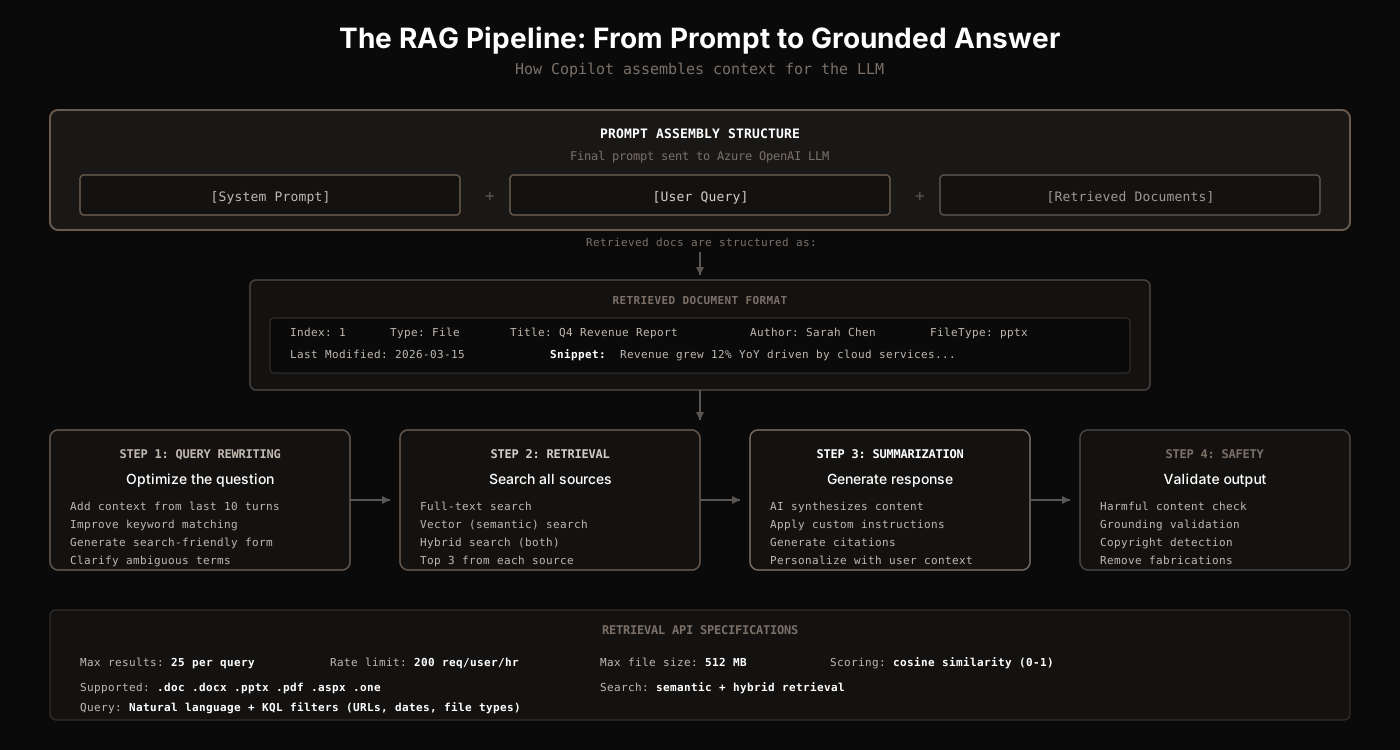
Microsoft implements Copilot as a sophisticated RAG (Retrieval Augmented Generation) system. The final prompt sent to the LLM follows the structure: [system prompt] + [user query] + [retrieved documents].
Retrieved Document Format
Each retrieved document is prefixed with structured metadata before being injected into the prompt:
Index: 1
Type: File
Title: Q4 Revenue Report
Author: Sarah Chen
Last Modified Time: 2026-03-15T10:30:00Z
File Type: pptx
File Name: Q4-Revenue-Report.pptx
Snippet: Revenue grew 12% YoY driven by cloud services
expansion across EMEA and APAC regions...
An internal function called #searchenterprise(query) handles enterprise search operations, similar to how ChatGPT uses search(query) for web retrieval.
The 4-Step Pipeline
The RAG pipeline operates in four discrete steps:
Step 1: Query Rewriting
The user's question is optimized for retrieval. This includes adding contextual signals from the last 10 conversation turns, improving keyword matching, and generating search-friendly query variants. The system clarifies ambiguous terms and resolves coreferences ("it," "that," "the document") using conversation history.
Step 2: Content Retrieval
The rewritten query runs against all configured knowledge sources. The system retrieves the top 3 results from each source. Supported retrieval methods include full-text search, vector (semantic) search, hybrid search (lexical + semantic), chunking, and re-ranking.
Step 3: Summarization & Response Generation
The AI synthesizes retrieved content, applies custom instructions for tone, formatting, and safety, generates citations linking back to source documents, and personalizes the response using user context.
Step 4: Safety & Governance Validation
The output goes through moderation for harmful, noncompliant, or copyrighted content. Grounding validation ensures the response is actually supported by the retrieved data. Any information not anchored to a source is flagged or removed.
Retrieval API Technical Specs
The M365 Copilot Retrieval API provides programmatic access to the same hybrid index that powers Copilot. Key specifications:
| Parameter | Value |
|---|---|
| Max results per query | 25 |
| Rate limit | 200 requests per user per hour |
| Max file size | 512 MB (PDF, PPTX, DOCX) |
| Relevance scoring | Cosine similarity, normalized 0-1 |
| Supported file types | .doc, .docx, .pptx, .pdf, .aspx, .one |
| Query language | Natural language + KQL filters (URLs, dates, file types) |
The Semantic Index
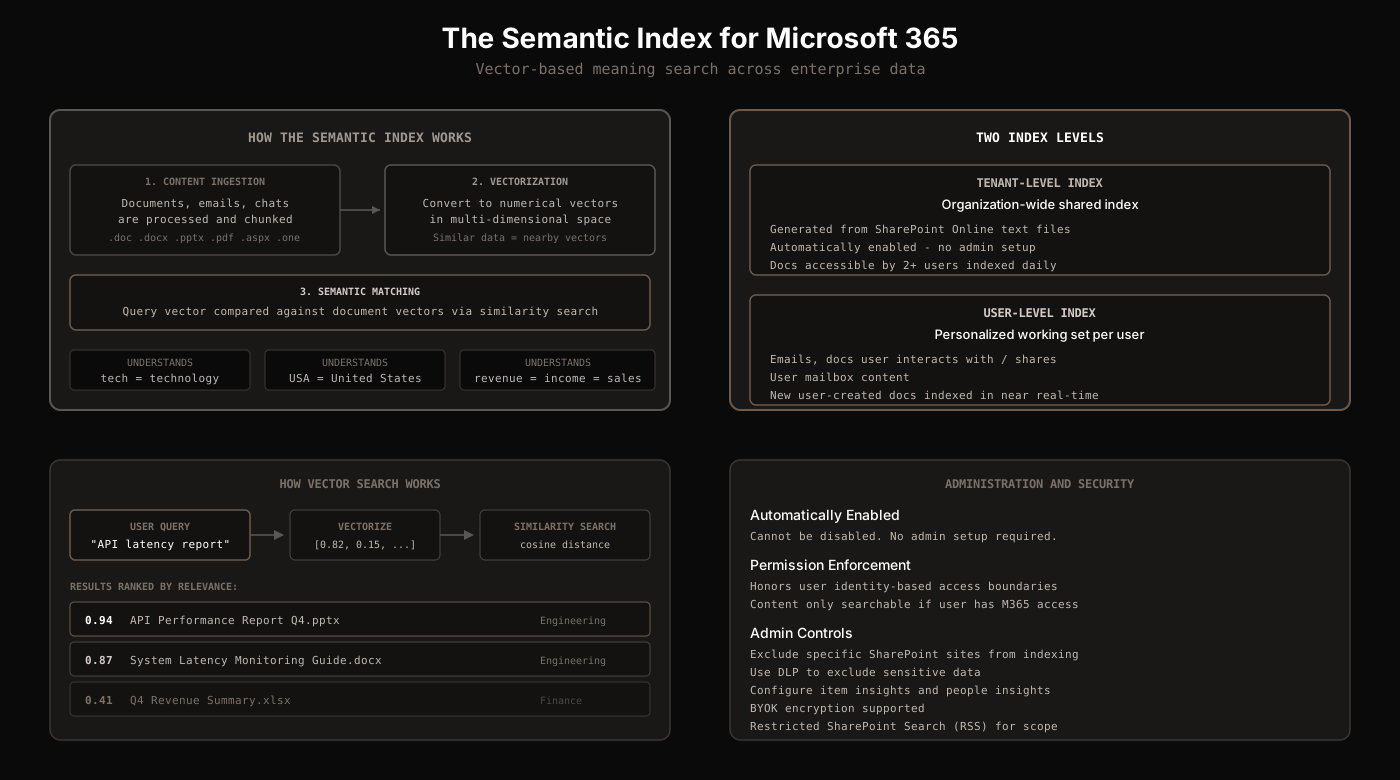
The Semantic Index is Microsoft's advanced indexing layer for enterprise search. Unlike traditional keyword-based search, it creates vectorized indices: numerical representations (vectors) of words, image pixels, and data points arranged in multi-dimensional spaces where semantically similar data points are clustered together.
How It Works
When a document is added to SharePoint, OneDrive, or another M365 source, the Semantic Index processes its text content and converts it into a vector embedding. When a user query comes in, it is also converted to a vector, and the system performs a fast similarity search based on vector distance. This means:
- A query for "tech stack" will find documents mentioning "technology infrastructure" or "software architecture"
- A query for "USA revenue" will find documents referring to "United States income" or "U.S. sales figures"
- Related assets are surfaced even when no exact keywords match
Two Index Levels
| Level | Scope | Update Frequency |
|---|---|---|
| Tenant-level | Organization-wide. Generated from text-based SharePoint Online files. Automatically enabled, no admin setup. | Docs accessible by 2+ users indexed daily |
| User-level | Personalized working set: emails, docs the user interacts with, comments on, or shares. Includes user mailbox. | New user-created docs indexed in near real-time |
Administration
The Semantic Index is automatically enabled and cannot be disabled. However, admins have several controls:
- Exclude specific SharePoint sites from indexing
- Use DLP to exclude sensitive data
- Configure item insights and people insights
- BYOK (Bring Your Own Key) encryption is supported
- Restricted SharePoint Search (RSS) can limit which content is searchable
The index honors user identity-based access boundaries. Content only appears in results if the user already has M365 access to it. Sensitivity labels, DLP policies, information barriers, and encryption usage rights are all respected.
Consumer Copilot vs. M365 Copilot vs. Traditional Bing
Understanding the differences between Copilot variants is essential because they share the same underlying technology but have fundamentally different data sources and use cases:
| Aspect | Traditional Bing | Consumer Copilot | M365 Copilot |
|---|---|---|---|
| Interface | 10 blue links | Conversational AI | Embedded in M365 apps |
| Query type | Keywords | Natural language | Natural language |
| Data source | Bing web index | Bing + Prometheus | Graph + Semantic Index + Bing (optional) |
| Follow-up | New search each time | Multi-turn conversation | Multi-turn + app context |
| Reasoning | None | GPT-4/5 + "Think Deeper" (o1) | GPT-4/5 + domain-specific |
| Access control | Public web | Public web | M365 RBAC enforced |
Multi-Turn Context Management
Copilot maintains conversation context through a context store that logs each interaction. Key details:
- The last 10 conversation turns are used as contextual signals during query rewriting
- In Teams, Copilot has context of the past 2 questions/responses over 24 hours
- Copilot Memory stores select user facts, preferences, and recurring topics independently of chat history, managed by the user
- Old conversation turns are truncated when context window limits are reached, with long threads summarized
Visual and Multimodal Search
Copilot supports visual search through vision-language models (VLMs) that combine image encoders and language decoders. Users can upload or snap a photo for instant identification of products, landmarks, plants, or animals. The system converts pixels into embeddings and maps them to natural-language outputs or retrieval queries. Copilot+ PCs include a Neural Processing Unit (NPU) rated at 40+ TOPS for local AI processing, enabling a hybrid on-device/cloud architecture.
Shopping with Copilot
When Copilot detects shopping intent in a query, it activates a separate shopping pipeline that returns structured product data alongside conversational answers. The experience is similar to ChatGPT's product cards, but with key differences in data sourcing and monetization.
How Product Results Work
Copilot displays shopping results as 5 or 6 product cards, each showing a photo, the store where it is available, price, and ratings. The system returns options based on several ranking signals:
- Prompt relevance: How closely the product matches what the user asked for
- Likelihood of engagement: Based on historical performance data across users
- Available merchant data: Product availability, pricing accuracy, and data completeness
- Other factors: Including ratings, review quality, and retailer reputation
Data Sources
Copilot summarizes and returns relevant results from across the web and from advertisers. Unlike ChatGPT Search (which primarily pulls from Google Shopping), Copilot's product data flows through Bing's merchant ecosystem, including Bing Shopping, Microsoft Merchant Center feeds, and Microsoft Advertising product listings.
Results can include sponsored links that are clearly identified. This is a significant architectural difference from ChatGPT Search, which claims all product results are organic with no paid placements.
Commission Model
Microsoft's disclosure states: "Except where identified, Microsoft does not receive commissions or other compensation for product suggestions or search results provided in Copilot." However, ranking is not affected by commissions for links that may earn Microsoft commissions. This means some product links may be affiliate links, but the ranking algorithm does not prioritize them.
Price Tracking
Copilot offers a built-in price tracking feature. Users can select a "Track Price" button on any product card and set:
- A price goal (e.g., "20% off the list price")
- An alert duration (e.g., "3 months")
- Optional email notifications when the price drops
This is a feature ChatGPT Search does not currently offer. It leverages Bing's existing price tracking infrastructure, which has been part of the Bing Shopping experience for years.
Copilot Checkout
In January 2026, Microsoft launched Copilot Checkout, enabling customers to complete purchases directly within Copilot conversations without leaving the platform. The conversation-to-conversion flow happens in one place: product inquiry, comparison, Q&A, and purchase.
Key details about Copilot Checkout:
- Merchants remain the merchant of record and retain transaction ownership, customer data, and relationship management
- Payment processing through PayPal, Stripe, and Shopify. Future integrations planned with Mastercard Agent Pay and Visa Intelligent Commerce
- Shopify merchants are automatically enrolled with opt-out option. PayPal/Stripe merchants apply for enrollment
- Microsoft is adopting the Agentic Commerce Protocol (ACP) as an open standard for merchant onboarding
- Initial merchant partners include Urban Outfitters, Anthropologie, Ashley Furniture, and Etsy sellers
- Rolling out in the U.S. on Copilot.com, expanding across Bing, MSN, Edge, and additional surfaces
Conversion Performance
Microsoft reports that users are 53% more likely to purchase within 30 minutes when Copilot is included in the shopping journey versus excluded. When shopping intent is present, purchase likelihood is 194% higher.
Brand Agents
Microsoft also introduced Brand Agents: AI-powered shopping assistants deployed on merchant websites that operate in a brand's distinctive voice. These agents handle product comparison, recommendations, shipping/returns guidance, upselling, and cross-selling based on purchase history.
Brand Agents can be deployed "in hours, not weeks" and are available for Shopify merchants through the Microsoft Clarity app. Alexander Del Rossa, a sleepwear retailer, reported over 3x higher conversion rates in Brand Agent-assisted sessions versus unassisted sessions. Analytics are built into Microsoft Clarity with dashboards tracking engagement rates, conversion uplift, and average order value.
Copilot Shopping vs. ChatGPT Shopping
| Aspect | Copilot | ChatGPT |
|---|---|---|
| Primary data source | Bing Shopping / Microsoft Merchant Center | Google Shopping (~83%) |
| Sponsored results | Yes, clearly labeled | No paid placements |
| Affiliate commissions | Some links, does not affect ranking | 4% ACP transaction fee |
| Price tracking | Built-in with alerts | Not available |
| In-app checkout | Redirects to retailer | Instant Checkout (ACP/Stripe) |
Inside a Real Copilot Shopping Response
To understand how the shopping pipeline actually works, we intercepted a real Copilot API response for a product query. Here is every data point in that response, explained.
The Response Structure
Unlike ChatGPT's flat message tree, Copilot returns a results array containing content blocks of four distinct types:
| Content Type | What It Does |
|---|---|
| activity | The "Thinking..." animation with steps: "Digging into the details," "Discovering options," "Sorting through the options" |
| text | Markdown-formatted conversational text with headings, bold, and lists |
| card | Structured product data. Card type: shoppingProducts with a products array |
| citation | Source attribution with title, url, publisher, and position |
Each content block has a unique partId and optional parentPartId for nesting. Text blocks and card blocks alternate in the response, allowing Copilot to weave product cards into the conversational flow.
Product Data Structure
Each product in the shoppingProducts card carries a rich data structure. Here is what we found for a Brooks running shoe:
| Field | Example | Purpose |
|---|---|---|
| id / groupId | SHO::LosFNp6sU5jf... | Unique product and group identifiers from Bing Shopping index |
| offerId | 41775243231293 | Specific merchant offer variant (Shopify variant ID in this case) |
| url | store.marathonsports.com/... | Merchant URL with utm_source=copilot.com tracking |
| price | {amount: 99.95, currencySymbol: "$"} | Structured price object with optional discountPrice |
| rating | {value: 4.57, count: 2801} | Aggregate review score with total review count |
| images | th.bing.com/th?id=OPHS... | Product images served through Bing's image proxy (not Shopify CDN directly) |
| seller / sellerLogoUrl | Marathon Sports | Merchant name and Bing-hosted logo |
| checkoutOption | {type: "buyWithCopilot", merchantProvider: "shopify"} | Copilot Checkout integration. null for non-enrolled merchants |
| canTrackPrice | true | Whether the price tracking feature is available for this product |
| tags | ["free-shipping"] | Badges displayed on the product card |
Interactive Filters
Each product carries a filters array with interactive filter options. For a Skechers shoe, the response included 17 size options, 3 width options, and 41 color variants, each with isSelected, isActive, and value fields. This means the full product variant catalog is pre-loaded in the response, allowing users to change size, color, or width without making another API call.
Review Aggregation
Products include a review object with an AI-generated summary and an attributions array linking back to the original review sources. For the Brooks Trace 3, the review summary was generated from Amazon reviews:
{
  "review": {
    "summary": "These shoes are praised for their comfort,
      support, and stylish design...",
    "attributions": [
      { "offerUrl": "amazon.com/dp/B0CNWRRF96",
        "domain": "www.amazon.com" }
    ]
  },
  "prosAndCons": {
    "pros": ["Comfortable and supportive",
             "Stylish", "Good cushioning"],
    "cons": ["White color gets dirty quickly",
             "Not as wide as expected"]
  }
}
The prosAndCons field is separate from the review summary, providing structured positive and negative attributes that the UI can render as bullet lists. Both the review and pros/cons include attribution links so users can verify the source material.
The checkoutOption Field: Copilot Checkout Detection
The checkoutOption field is how the UI knows whether to show a "Buy with Copilot" button or a standard merchant link. In the intercepted response:
- A Marathon Sports product (Shopify merchant) shows
{type: "buyWithCopilot", merchantProvider: "shopify"}, enabling in-Copilot checkout - A Zappos product shows
checkoutOption: null, meaning the user is redirected to the retailer's website
This confirms that Copilot Checkout is currently limited to enrolled Shopify merchants, while all other retailers get standard outbound links with utm_source=copilot.com tracking.
URL Tracking: Not All Links Are Equal
A closer look at the merchant URLs reveals different tracking strategies per retailer:
| Merchant | URL Parameters | What This Tells Us |
|---|---|---|
| Marathon Sports (Shopify) | _gsid=mMqyBPyZZZ1C&utm_source=copilot.com | Shopify session ID + Copilot attribution |
| Zappos | utm_medium=affiliate&splash=none&utm_source=copilot.com | Tagged as affiliate link. Microsoft earns commission |
| Skechers | utm_source=copilot.com | Standard attribution only |
| Amazon | utm_source=copilot.com | Standard attribution only |
The Zappos link is the smoking gun: utm_medium=affiliate confirms Microsoft is earning affiliate commissions on at least some product links, validating their disclosure that "ranking is not affected by commissions for links that may earn Microsoft commissions." Not all links are affiliate links, as the Skechers and Amazon URLs use only standard attribution.
Hidden Metadata Fields
Several metadata fields in the response are not visible to the user but reveal architectural details:
- channel:
"web"indicates which Copilot surface served the response (web vs Edge vs Windows vs Teams) - reaction: Present on every content block.
nulluntil the user gives feedback. Used for RLHF-style training signals - parentPartId:
nullfor top-level blocks. Enables nested content structures for richer layouts - curationInfo:
nullon all products. Likely reserved for editorially curated or promoted product placements - brandGroupId:
nullon all products. A prepared field for grouping products by brand across merchants - isActive: On filter values.
falsefor out-of-stock variants (e.g., Yellow, Violet, Blush for Skechers), preventing selection in the UI
What About Query Fanouts?
Unlike ChatGPT, where you can see the literal search("query") function calls in the message tree, Copilot's search queries are completely hidden from the API response. The only trace of the search process is the activity block with its three thinking steps:
{
  "type": "activity",
  "activity": {
    "title": "Thinking...",
    "status": "completed",
    "steps": [
      { "title": "Digging into the details",
        "status": "completed" },
      { "title": "Discovering options",
        "status": "completed" },
      { "title": "Sorting through the options",
        "status": "completed" }
    ],
    "artifacts": []
  }
}
The artifacts array is empty here but appears designed to hold intermediate results. There are no visible search queries, no Bing API call logs, and no grounding data in the client-facing response. Microsoft's documentation states that web search query citations are available in Copilot Chat and visible for 24 hours, but for shopping queries, the search process is entirely opaque.
This is a significant difference from ChatGPT Search, where every search query, every source URL, and every citation reference is exposed in the raw response. Copilot keeps its Prometheus/Bing orchestration pipeline completely server-side and only sends the final product data and conversational text to the client.
What the user actually sees
Reproduction of a real Microsoft Copilot shopping response for "best footwear for elderly," rendered using Copilot's actual design system colors and layout patterns.
For seniors, the safest footwear combines non-slip soles, strong arch support, cushioning, and easy on/off designs.
Here are the best footwear options for elderly adults, based on safety, comfort, and ease of use:
Best Overall Support & Stability

Brooks Women's Adrenaline GTS 24
Brooks Trace 3 Running Shoes for Men
Color and size options available
Why these are great for seniors:
- Excellent arch support
- Shock absorption reduces knee/hip pain
- Stable heel design to prevent wobbling
- Breathable and lightweight
Best Easy Slip-On Shoes (No Bending Needed)
Skechers Slip-ins Go Walk Flex Sneakers
Size and width options available
Skechers Go Walk Joy Slip-On Shoes for Women
Color and size options available
Ideal for: seniors with limited mobility, back pain, or difficulty tying laces
Benefits:
- Hands-free slip-in design
- Non-slip soles
- Very lightweight and cushioned
Best for Diabetic, Swollen, or Sensitive Feet
JOINFREE Women's Barefoot Walking Shoes
OrthoComfoot Orthopedic Walking Shoes for Men
Size and color options available
FitVille Diabetic Walking Shoes for Women
Size options available
Why these matter:
- Wide toe box prevents pressure
- Adjustable straps accommodate swelling
- Seamless interiors reduce friction
- Soft cushioning for neuropathy
Best Indoor House Shoes for Seniors
BARERUN Womens Slippers Wide Diabetic Shoes For Women Adjustable House Slippers
Great for: seniors who need safe, warm, non-slip footwear at home
Features:
- Non-slip rubber sole
- Soft, warm lining
- Adjustable fit for bunions or swelling
Premium Orthopedic Option (Maximum Support)
Vionic 23Walk 2.0 Walking Shoes Unisex
Color and size options available
Orthofeet Women's Nira Running Shoes
Size and color options available
Why choose these:
- Medical-grade arch support
- Excellent for plantar fasciitis, knee pain, or balance issues
- Durable and long-lasting
How to Choose the Right Footwear for an Elderly Person
Must-Have Features
- Non-slip outsole (critical for fall prevention)
- Firm heel counter for stability
- Cushioned midsole to reduce joint impact
- Wide toe box for comfort
- Easy closure (Velcro or slip-on)
- Lightweight materials
Helpful Questions
- Do they have balance issues? Choose slip-resistant walking shoes
- Do they have swollen feet or diabetes? Choose extra-wide, adjustable shoes
- Do they struggle with bending or tying laces? Choose slip-ins
If you want, I can help you pick the best pair based on the person's age, mobility level, foot condition (swelling, diabetes, pain), and budget.
Key Differences from ChatGPT's Shopping Response
| Aspect | Copilot | ChatGPT |
|---|---|---|
| Product IDs | Bing Shopping IDs (SHO:: prefix) | Numeric IDs from shopping providers |
| Image hosting | th.bing.com proxy | images.openai.com proxy |
| Review data | AI summary + pros/cons + source attribution | Aggregate rating only, no AI summary |
| Variant filters | Full catalog pre-loaded (size, color, width) | Not pre-loaded, requires new search |
| Checkout | buyWithCopilot for Shopify | ACP/Stripe Instant Checkout |
| URL tracking | utm_source=copilot.com | utm_source=chatgpt.com |
Citations and Source Attribution
Copilot generates citations differently depending on the data source:
Web Citations
When Copilot uses Bing search data, the Prometheus model generates numbered citations [1], [2], etc. with clickable links to source pages. Since November 2025, publisher names are displayed alongside citations and sources are shown in consolidated panels for easier verification.
Enterprise Citations
When retrieving from Microsoft Graph, citations reference the specific documents, emails, or other content used. The stored data includes the user's prompt and Copilot's response, including citations to any information used to ground the response. Users can click through to the original document in SharePoint, OneDrive, or the relevant M365 app.
Web Search Query Citations
A unique transparency feature: Copilot shows the exact search queries (derived from the user's prompt) that were sent to Bing. This gives users visibility into what was actually searched, separate from what they asked. These are available in Copilot Chat only and visible for 24 hours.
What Gets Cited More Often
Based on analysis of Copilot's citation patterns, pages more likely to appear as AI citations share these characteristics:
- Clear factual statements under descriptive headings
- Structured data (tables, step-by-step processes)
- Specificity over promotional language
- Current, up-to-date information
- Pages covering multiple sub-questions within a single topic are 161% more likely to appear as AI citations
Responsible AI: Defense-in-Depth
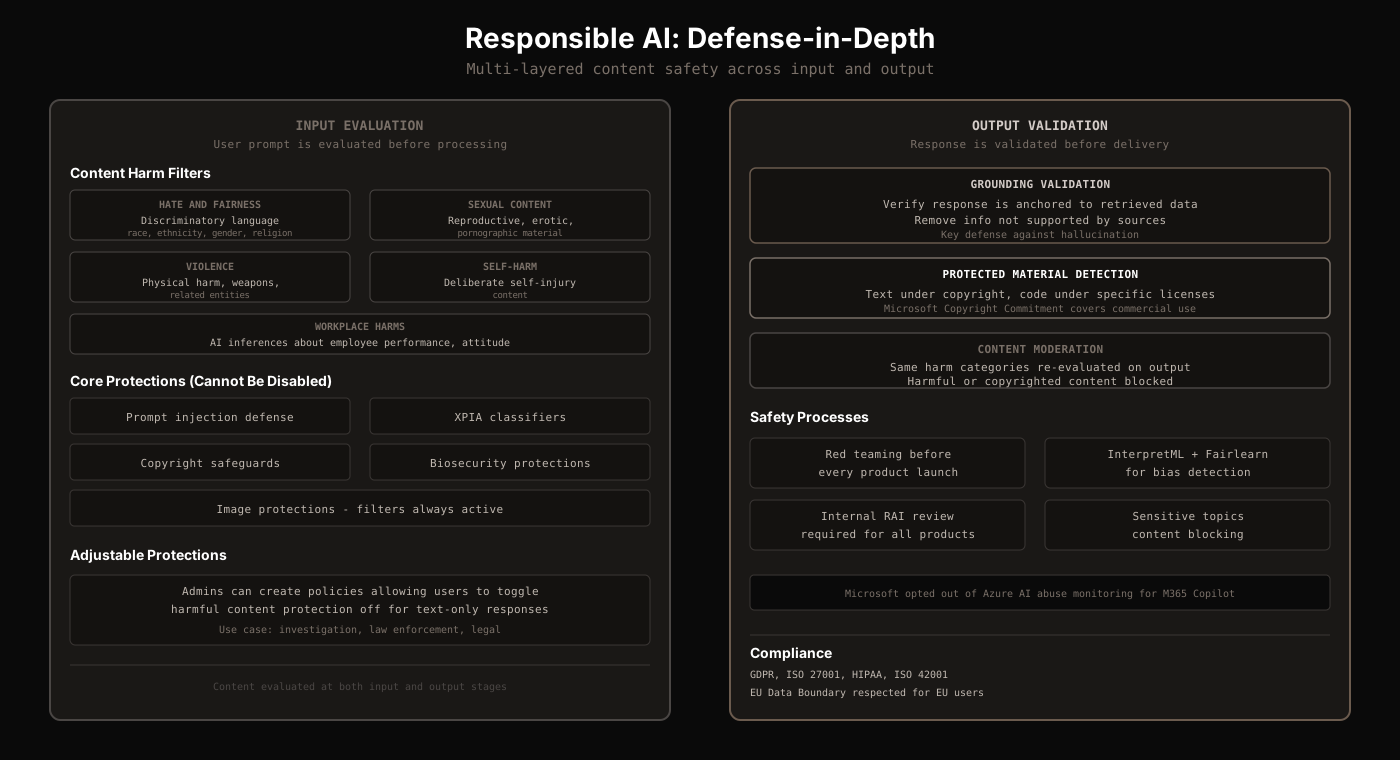
Microsoft employs a defense-in-depth approach to AI safety. Content is evaluated at two points: when the user submits input, and before the response is delivered. This dual evaluation ensures that both prompt attacks and generated content are filtered.
Content Harm Filters
Both input and output are evaluated against five harm categories:
| Category | What It Covers |
|---|---|
| Hate & Fairness | Pejorative/discriminatory language based on race, ethnicity, gender, religion, etc. |
| Sexual Content | Reproductive, erotic, pornographic content |
| Violence | Physical harm, weapons, related entities |
| Self-Harm | Deliberate self-injury content |
| Workplace Harms | AI making inferences about employee performance, attitude, or personal characteristics |
Core Protections (Cannot Be Disabled)
Five protections are always active, regardless of admin configuration:
- Prompt injection defense: Jailbreak classifiers that detect and block manipulation attempts
- Cross-prompt injection attack (XPIA) classifiers: Detect when external content attempts to hijack the model's behavior
- Copyright safeguards: Protected material detection for text and code
- Biosecurity protections: Block generation of content related to biological threats
- Image protections: Content filters always remain active for images, even when text protections are disabled
Adjustable Protections
For specific use cases like investigation, law enforcement, and legal scenarios, admins can create policies allowing users to toggle harmful content protection off for text-only responses in specific conversations. This is the only adjustable layer. All core protections remain active.
The Copyright Commitment
Microsoft offers a Copyright Commitment: if a third party sues a commercial customer for copyright infringement based on Copilot's output, Microsoft will defend the case and pay any resulting judgments. This applies to all commercial Copilot customers.
What This Means for Your Content
Understanding Copilot's architecture changes how you think about visibility in AI-powered search. Here are the practical takeaways:
Bing optimization is Copilot optimization
Consumer Copilot is grounded entirely to Bing's web index. If your content ranks well in Bing, it has a direct path to appearing in Copilot's responses. The same SEO fundamentals that work for Bing apply here: clear title tags, descriptive meta descriptions, structured data markup, and fast page load times. Since Copilot uses only pre-indexed content (no live crawling), your content must be properly indexed by Bingbot first.
Structure your content for retrieval
Copilot's RAG pipeline chunks documents and scores them for relevance. Pages that use clear headings, structured data (tables, step-by-step processes), and factual statements are more likely to be selected and cited. Content covering multiple sub-questions within a single topic is 161% more likely to appear as an AI citation.
Enterprise data quality matters
For M365 Copilot, the quality of your organization's data directly determines Copilot's output quality. Disorganized SharePoint sites, poorly named files, and outdated documents will produce poor AI answers. Microsoft's Semantic Index surfaces content based on meaning, but "garbage in, garbage out" still applies. Clean, well-structured, and up-to-date enterprise data is now a competitive advantage.
Privacy by design matters to users
Copilot's architecture includes significant privacy controls: queries to Bing are sanitized, Azure OpenAI does not cache content, and enterprise data never leaves the M365 service boundary. For content creators, this means Copilot users are more likely to engage with your content because trust in the platform is higher. For enterprises, it means internal data stays protected by the same RBAC, DLP, and sensitivity labels already in place.
There is no single ranking
Like ChatGPT Search, Copilot produces non-deterministic, personalized responses. The same query from two different users (or the same user at different times) will produce different answers and cite different sources. Conversation context, the last 10 turns, and user-level Copilot Memory all influence which content gets surfaced. Monitoring your AI visibility across multiple queries and contexts is more important than chasing a position number.
Copilot Connectors extend reach
M365 Copilot can search third-party data through Copilot Connectors (ServiceNow, Confluence, Salesforce, Zendesk, and custom sources). If your product or service has data in these systems, it can appear in Copilot's enterprise search results. Building a Copilot Connector for your platform is an emerging distribution channel.
Sources
- Microsoft Learn - "Microsoft 365 Copilot Architecture"(three pillars, orchestration engine, data flow)
- Zenity Labs - "Inside Microsoft 365 Copilot: A Technical Breakdown"(orchestration pipeline details, function matching, prompt structure)
- Zenity Labs - "A Look Inside Copilot's RAG System"(RAG pipeline, document format, #searchenterprise function)
- Bing Search Quality Insights - "Building the New Bing"(Prometheus model, Bing Orchestrator, grounding mechanism)
- Microsoft Learn - "How the Microsoft 365 Copilot Orchestrator Chooses Actions"(function matching hierarchy, action selection, declarative agent limits)
- Microsoft Learn - "Semantic Indexing for Microsoft 365 Copilot"(two index levels, vectorization, supported file types, admin controls)
- Microsoft Learn - "Data, Privacy, and Security for Web Search in M365 Copilot"(web query sanitization, Bing data usage, privacy controls)
- Microsoft Learn - "Data, Privacy, and Security for Microsoft 365 Copilot"(Azure OpenAI caching policy, training data exclusions, compliance certifications)
- Microsoft Learn - "Enhance AI Responses with RAG - Copilot Studio"(4-step RAG pipeline, query rewriting, hybrid retrieval)
- Microsoft Learn - "M365 Copilot Retrieval API Overview"(API specs, relevance scoring, file type support, rate limits)
- Microsoft Learn - "Manage Harmful Content Protection - Copilot Chat"(content harm filters, core vs adjustable protections, workplace harms)
- Microsoft Learn - "Apply Responsible AI Principles - Copilot Studio"(red teaming, InterpretML, Fairlearn, copyright commitment)
- Search Engine Land - "Microsoft Explains How Bing AI Chat Uses Prometheus"(Prometheus internals, Bing Orchestrator, grounding 4x increase)
- Microsoft - "Traditional Search vs Copilot AI Search"(consumer Copilot vs Bing comparison)
- Microsoft Learn - "Generative Orchestration - Copilot Studio"(LLM-driven planning, multi-agent orchestration)
- Dellenny - "Multi-Turn Conversations and Context Management in Copilot Studio"(context window management, variable system, multi-turn limitations)
- Microsoft Support - "Shopping with Microsoft Copilot"(product cards, price tracking, commission disclosure, data sources)
- Microsoft Advertising Blog - "Conversations That Convert: Copilot Checkout and Brand Agents"(Copilot Checkout, Brand Agents, conversion data, payment partners, ACP adoption)
Track Your AI Search Visibility
See exactly how Copilot, ChatGPT, and other AI search engines handle your brand's queries. Monitor query fanouts, track citations, and understand where your content appears across all AI search platforms.
Try the Query Fanouts Extension