A Quick Recap
In a previous blog, we introduced Query Fanouts, the sub-queries ChatGPT generates when researching your question. Our extension captures those, giving you visibility into what the AI is actually searching for.
For shopping-related questions like "best mechanical keyboard under 10000" or "wireless earbuds for running", ChatGPT goes a step further. It doesn't just search the web; it fetches product data and displays recommendations directly in its response, complete with prices, ratings, and merchant links.
We wanted to know where that product data comes from and how it gets there. So we built a feature to capture it.
What's New: Product Recommendations Capture
Now our extension can also capture the products listed in ChatGPT's response, alongside the query fanouts we were already capturing. In addition, we extract and display the metadata behind every product being listed in GPT's response.
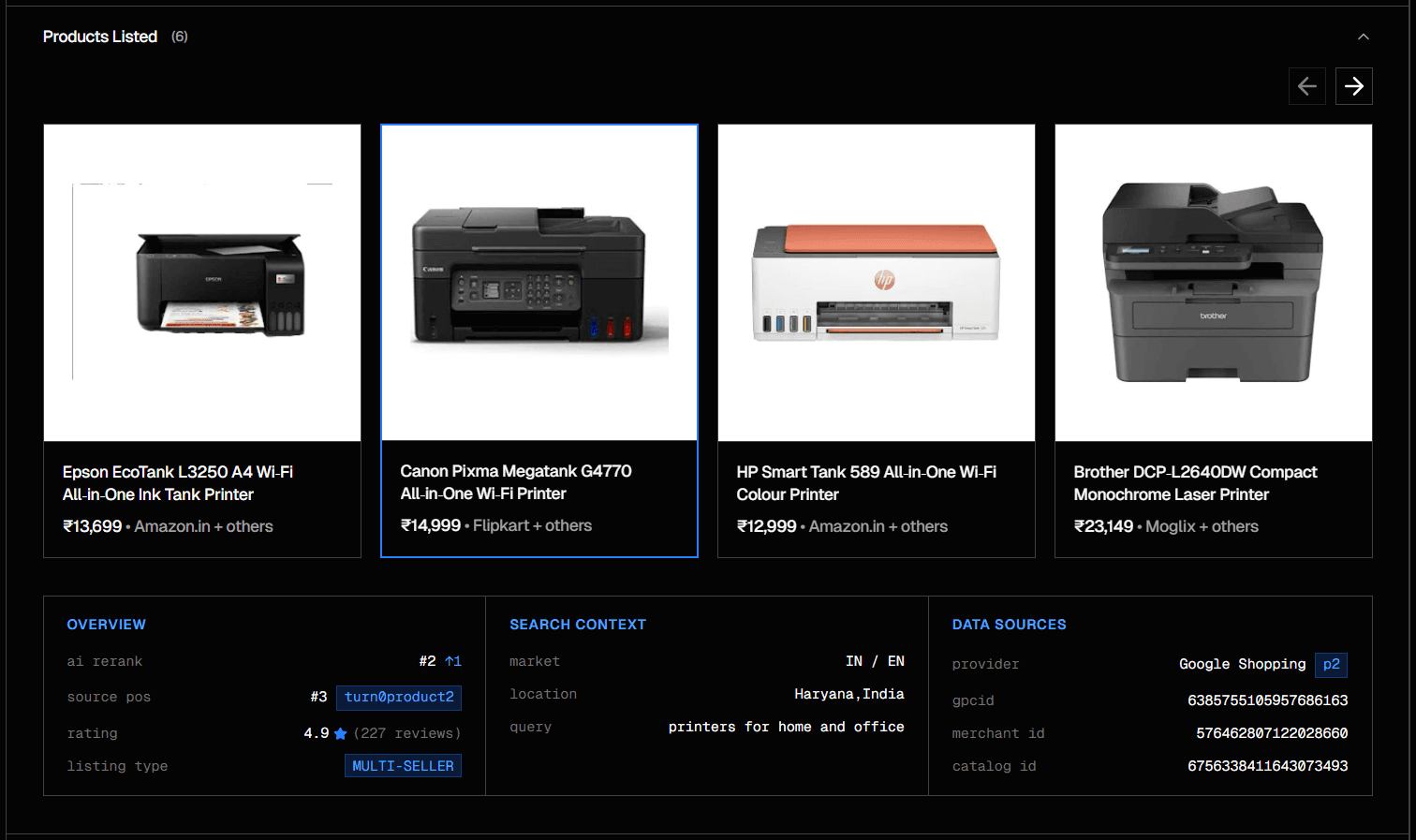
The products are displayed in the same carousel format as ChatGPT shows them. When you click on any product, a metadata panel appears below with additional data collected from the API response.

Product Metadata
Overview
- AI Rerank - Shows the product's position in the final carousel and how much it moved from its original position
- Source Pos - The original position and citation reference from the API response
- Rating - Star rating and review count when available
- Listing Type - Multi-Seller, Single in Cluster, or Standalone
Search Context
- Market - Country and language codes (e.g., IN / EN)
- Location - User location if detected
- Query - The search query sent to fetch products
Data Sources
- Provider - Where the product data appears to come from
- gpcid - A product cluster identifier
- Merchant ID - A merchant identifier when present
- Catalog ID - A catalog reference number
What We Observed
We ran a handful of product queries and looked at the captured data. A few patterns stood out.
The p2 Provider
Every product we captured had a providers: ["p2"] tag. Based on the structure of the decoded tokens, this appears to be Google Shopping data.
Carousel Order vs Internal Index
Each product has an internal reference like turn0product0. You'd assume product0 appears first in the carousel. It doesn't always.
ChatGPT seems to reorder products after receiving them, possibly based on relevance to the specific question.
The MID Pattern
We noticed that some products have all three identifiers (catalogid, gpcid, mid), while others only have a product ID. This led us to create three labels:
| Label | What We Observed |
|---|---|
| Multi-Seller | Has mid, multiple merchants shown |
| Single in Cluster | Has gpcid but no mid |
| Standalone | Only productid, single exclusive listing |
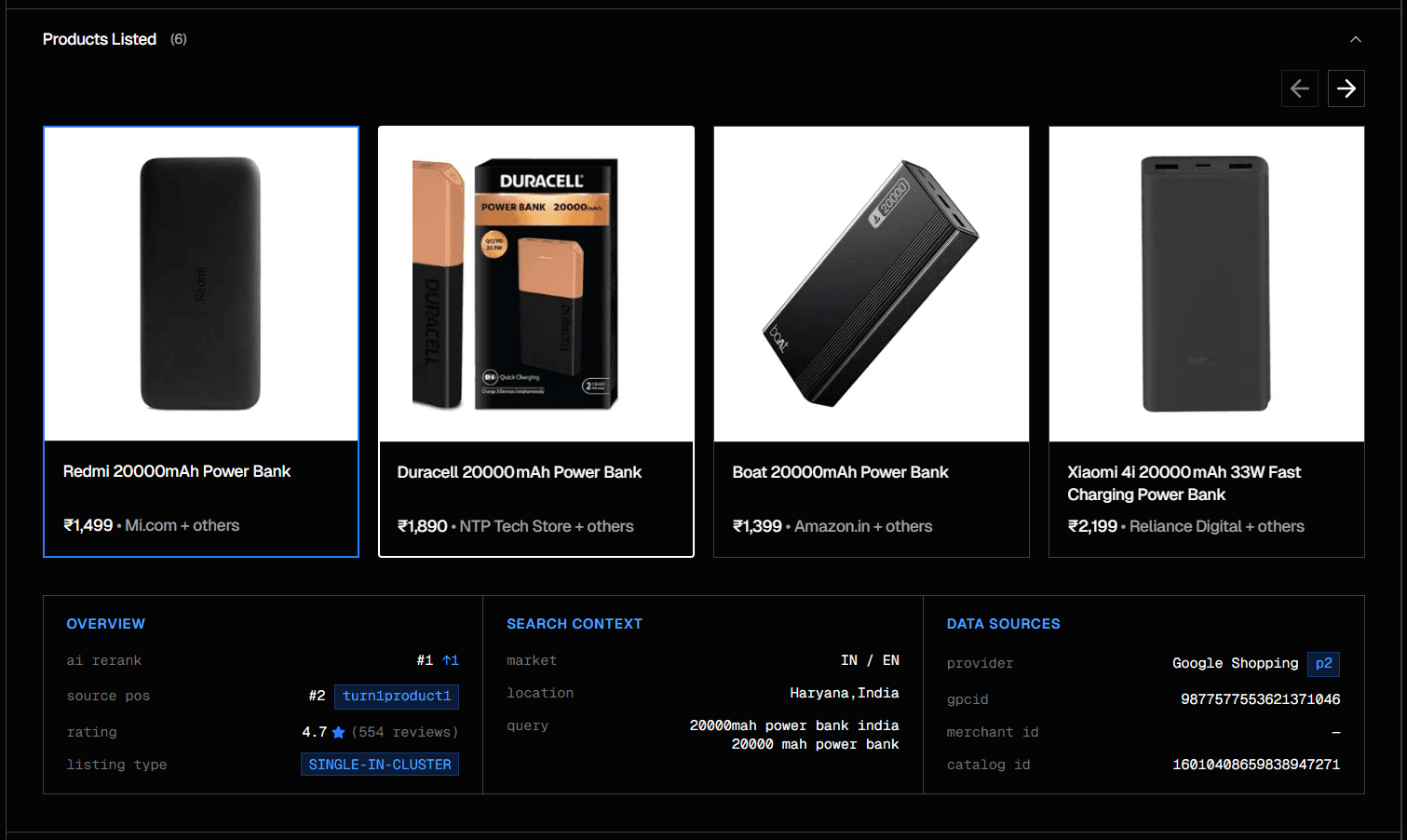
Query: "best rated power bank 20000mah"
Location Context
Every product token we decoded contained a uule parameter, an encoded location string.
This suggests the Shopping Connector is geo-targeted. The products you see may differ based on where you are, or where ChatGPT thinks you are.
What This Tool Helps With
We built this feature for SEO and e-commerce professionals who want to understand how products surface in AI responses. The extension captures what ChatGPT receives, so you can:
- See the raw data, not just what's displayed but the underlying payload
- Track carousel positions and know where products rank for specific queries
- Identify metadata patterns like cluster IDs, merchant tags, provider sources
- Export for analysis, copy JSON, compare across queries
A Note on What We Don't Know
There's a lot we haven't figured out:
- Why does ChatGPT reorder products? We see that it does, but not the logic behind it.
- What are p1 and p3? These appear in some metadata fields but not as primary providers.
- How stable are these patterns? Our observations come from a small set of queries in one market.
We'll keep exploring. If you run queries and notice something interesting, we'd love to hear about it.
Try It Yourself
The Product Recommendations capture is live in the latest version of our extension. Run a shopping query on ChatGPT, and you'll see the data appear in your report.
Get the ExtensionWhat's Next
This is Part 2 of our series on what happens inside ChatGPT when you ask a question. We've covered Query Fanouts and now the Shopping Connector.
There's more to explore, like how citations are structured, how news results differ from web results, and how the AI decides what to include. We'll share what we find.