What Are Query Fanouts?
When a large language model (LLM) performs a web search on behalf of a user, it rarely runs just one query. Instead, it breaks the original prompt into multiple smaller, related search queries. These sub-queries are called query fanouts, and they reveal what the model is actually searching for behind the scenes.
Think of query fanouts as the hidden roadmap an AI uses to research a question before generating its final answer.
How Do Query Fanouts Work?
Query fanouts are generated whenever an LLM answers a question with web search enabled. The model refines the intent of the original prompt and sends out a set of high-intent search queries that help it build the final response.
Where to See Query Fanouts
You can view them in several ways:
- API responses: When web search is enabled, the API includes the fanout queries in the network call results.
- Network developer tools: In the browser, using the session/message ID you can inspect the Network tab to see the fanouts.
Query Fanouts by Platform
Different AI platforms implement query fanouts in their own ways. Here's how the major players handle them:
Query Fanouts in ChatGPT
ChatGPT uses query fanouts when its web browsing feature is enabled. The model breaks down complex queries into targeted sub-searches to gather comprehensive information before synthesizing a response.
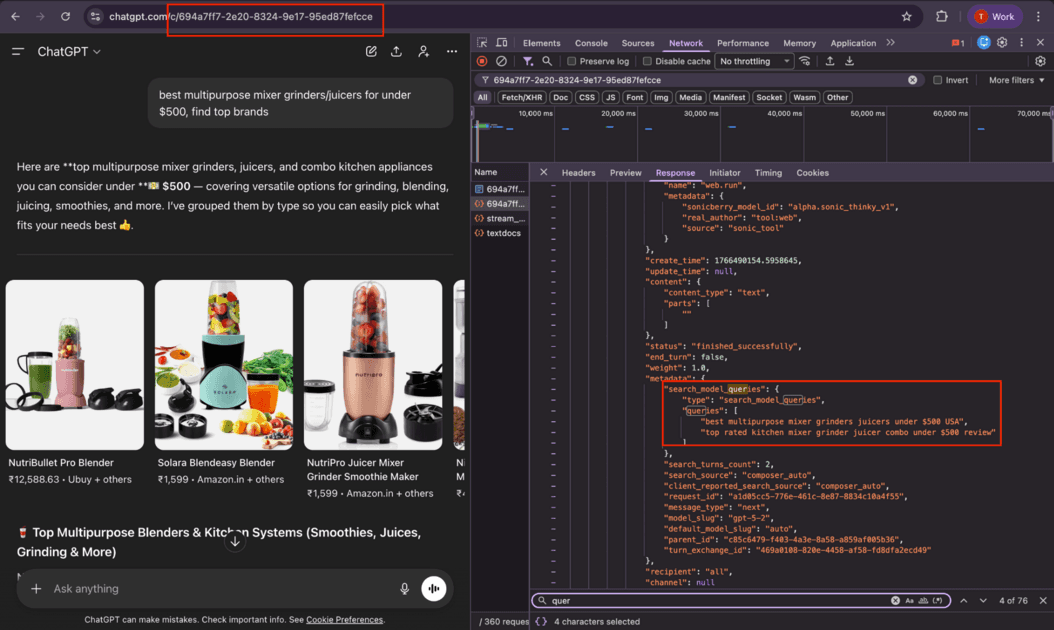
| Metadata | Description |
|---|---|
| title | Auto-generated conversation title |
| conversation_id | Unique ID for the chat session |
| search_queries | The search terms ChatGPT uses to find information |
| citations | Links to websites used in the response |
| search_turns_count | Number of web searches performed |
Query Fanouts in Perplexity
Perplexity is built specifically for AI-powered search and makes extensive use of query fanouts to provide comprehensive, well-sourced answers.
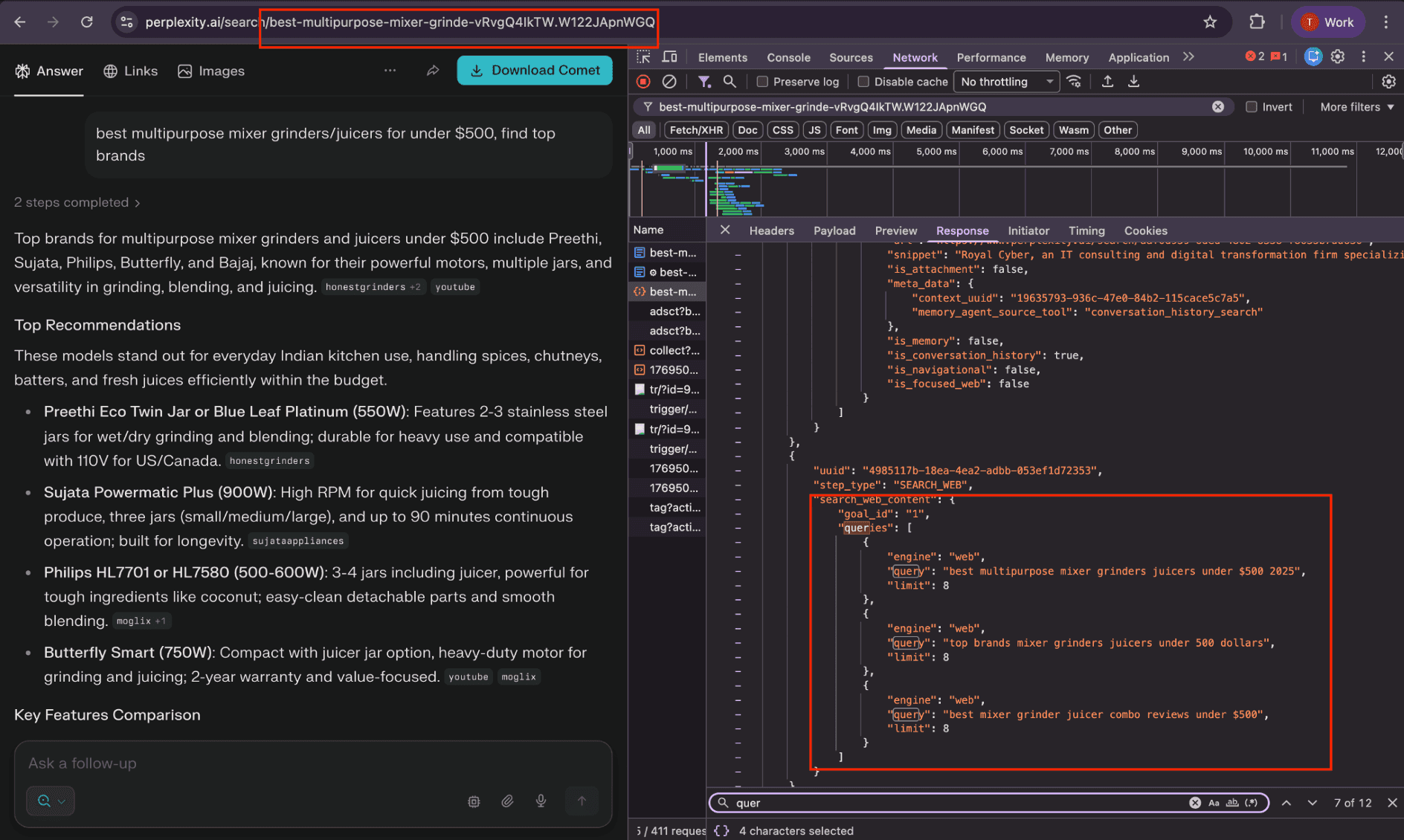
| Metadata | Description |
|---|---|
| query | The original search question |
| web_results | List of websites searched and used |
| citations | Numbered references to sources in the answer |
| domain | Source website names |
Query Fanouts in Claude
Claude by Anthropic also utilizes query fanouts when connected to web search tools, decomposing complex queries into focused searches.
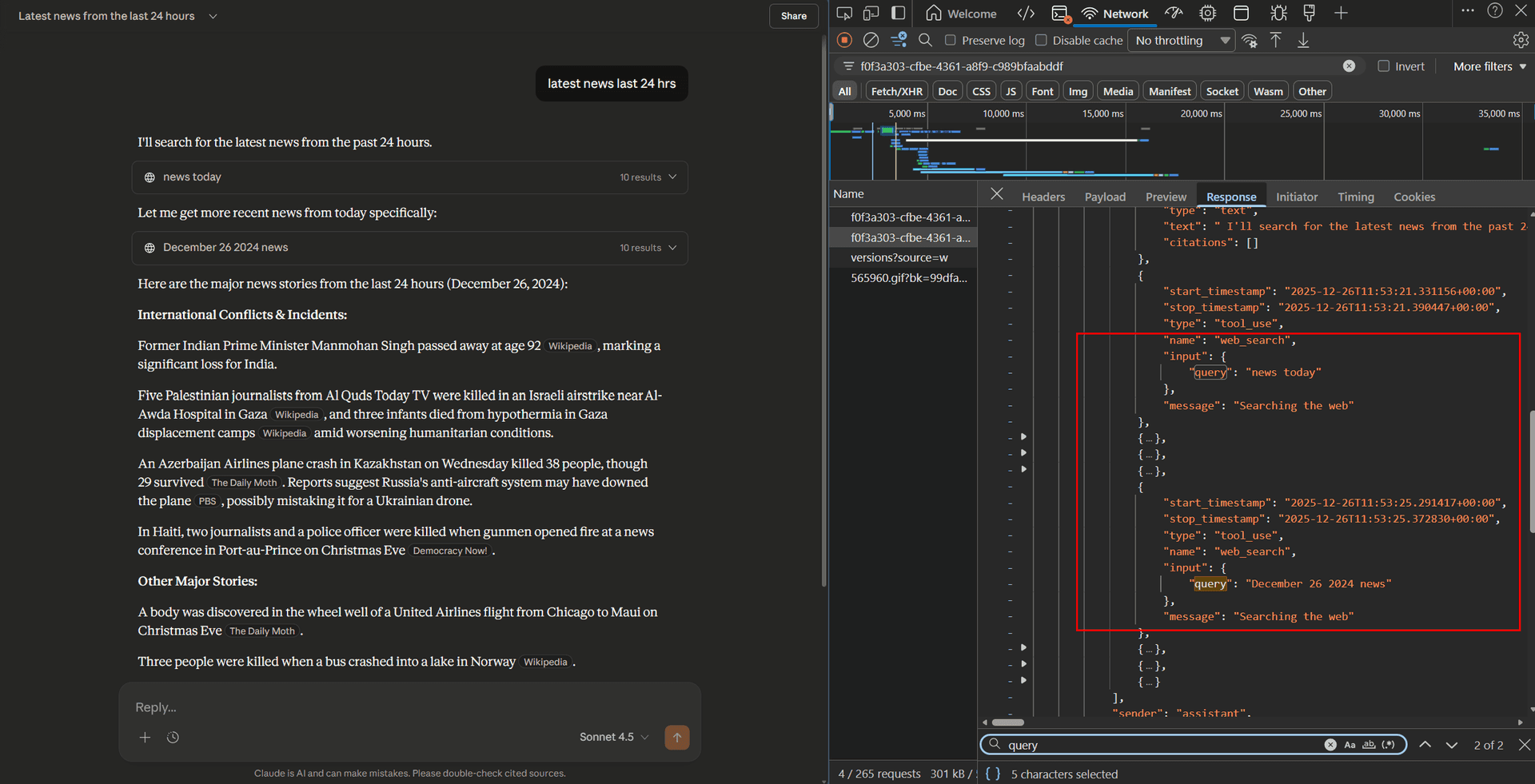
| Metadata | Description |
|---|---|
| name | Conversation title |
| web_search.query | The search terms Claude uses to find information |
| knowledge_results | List of websites found during search |
| citations | Links referenced in the final response |
How Does This Help Your Brand?
If your brand is not mentioned in AI-generated answers, it means you likely don't have content that directly addresses the query fanouts the model is using. To get mentioned, you need to create pages that directly target those specific query fanouts.
Understanding query fanouts transforms content strategy from guesswork into data-driven optimization.
How Rankly's Query Fanout Extension Works
Our Query Fanouts Extension makes it easy to discover exactly what AI models are searching for:
Enter Your Query
Type in any search query you want to analyze.
See the Fanouts
View the complete list of sub-queries the AI generates.
Optimize Your Content
Create targeted content for each fanout to improve your AI visibility.
How We Use Query Fanouts Internally
We use query fanouts as the foundation of our content and optimization strategy. For every tracked query, we show:
- The complete list of fanouts: Every sub-query the AI model generates.
- Coverage analysis: Which fanouts your site already covers.
- Actionable recommendations: Specific suggestions for missing pages and content gaps.
This removes guesswork from content planning. Instead of optimizing for a single keyword, you optimize for the full set of queries an AI model actually uses.
Get Started
Curious about what AI models are actually searching for when users ask about your brand or industry?
Try our Query Fanouts Extension to discover exactly what AI searches for your queries - and much more!
Try the Query Fanouts Extension
Uncover the hidden queries AI uses to answer questions about your brand.
Get Started